
Seat Leon >> Parking with Park Assist
Before initiating automated parking with your Seat Leon, verify that all system prerequisites have been fully met and that your desired parking mode has been correctly selected.
Parking
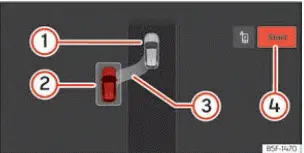
Fig. 157 On the infotainment system display:
parallel parking position.
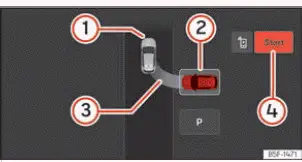
Fig. 158 On the infotainment system display:
parking bay parking position.
- Your vehicle
- Detected parking space
- Visual indication showing the proposed parking manoeuvre
- Start parking manoeuvre indicator
- Observe the digital instrument cluster display screen to verify whether the passing space has been classified as "appropriate" and if the precise starting position for parking has been achieved ››› Fig. 157, ››› Fig. 158. A parking space is recognized as appropriate as soon as the instrument cluster displays parking indication graphic 3.
- Bring your Seat Leon to a complete stop, pause briefly, and engage reverse gear, or press the dedicated shortcut button in the infotainment system menu via
 > Assistants > Parking > Park assist system.
- Release your hands completely from the steering wheel rim.
- Pay close attention to the following advisory message on the screen:
Steering intervention active. Watch your surroundings!
While maintaining continuous visual awareness of your immediate surroundings, gently begin accelerating up to a maximum speed of 7 km/h (4 mph). During the automated parking maneuver, the system assumes full control exclusively over the steering mechanism. You, as the driver, remain responsible for operating the accelerator, manipulating the clutch pedal when necessary, executing gear shifts, and applying the brakes.
- Reverse slowly until the continuous acoustic ParkPilot signal sounds; OR: reverse until the visual prompt to move forward appears on the instrument cluster display; OR: reverse until the Park Assist finished message is shown on the instrument cluster. Progress bar 5 indicates the remaining travel distance to cover.
- Depress and hold the foot brake pedal until the Park Assist system finishes turning the steering wheel automatically; OR: until the indicator symbol
 goes out on the instrument cluster display screen.
- Select first gear.
- Move forward cautiously until the continuous ParkPilot tone sounds; OR: move forward until the reverse instruction appears on the cluster display. The Park Assist system will automatically steer your Seat Leon back and forth until the car is perfectly centered within the parking bay.
- To achieve the cleanest parking alignment, wait patiently at the end of each maneuver phase until the Park Assist system has finished turning the steering wheel completely. The automated parking procedure concludes formally when a corresponding confirmation message appears on the instrument panel, accompanied in certain cases by an audible chime.
Progress bars
The dynamic progress bar shown on the instrument cluster display visualizes the relative distance remaining to be covered during the maneuver. The greater the remaining distance, the fuller the progress bar graphic appears. When driving forward into a space, the progress bar indicator depletes upward, whereas when reversing, it depletes downward.
Note If an automated parking maneuver is terminated prematurely or interrupted before completion, the final parking position of your Seat Leon may not be optimal.
 Selecting a parking type
Fig. 156 On the infotainment system display:
parking modes indication.
The Park Assist system integrated into your Seat Leon offers 5 distinct parking types designed to handle different urban park ...
 Leaving a parking space with the
Park assist system (only for parallel
parking)
Fig. 159 On the instrument cluster display:
driving off from a parallel space.
Your vehicle positioned in reverse gear
Advisory text message giving the proposed manoeuvre to exit the pa ...
See also:
Lane change assist
Overview - lane change assist
- Front camera for driver assist
systems - R242-
Removal and installation
- Windscreen heater for sensors,
front - Z113-
Installation location: in ...
