
Seat Leon >> Selecting a parking type
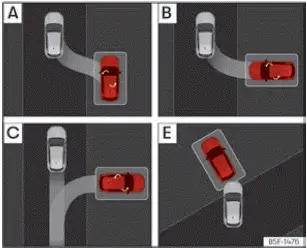
Fig. 156 On the infotainment system display:
parking modes indication.
The Park Assist system integrated into your Seat Leon offers 5 distinct parking types designed to handle different urban parking scenarios:
- Reverse parallel parking into a suitable kerbside space.
- Reverse angle or perpendicular parking into a marked parking bay.
- Forward angle or perpendicular parking into a marked bay space.
- Reverse parallel parking without driving past the space first: the "Help me" completed maneuver function.
- Forward or reverse parking into a bay or perpendicular space without needing to drive past it first.
Selecting a parking type after passing in front of the space
After activating Park Assist and successfully detecting a suitable space as you drive by, the system automatically evaluates the dimensions and proposes the most appropriate parking type on the instrument cluster display.
The selected parking mode is displayed clearly on the digital instrument cluster ››› Fig. 156 and mirrored on the central Infotainment system touchscreen.
- Ensure all fundamental operating conditions required to park with Park Assist are satisfied before initiating the sequence.
- Press the virtual button
 in the infotainment system menu (
 > Assistants).
- When the feature is switched on, the dedicated icon on the infotainment screen is highlighted
 . Additionally, the preselected parking type appears on the instrument cluster. You can tap the infotainment screen to switch between alternative parking modes manually.
- If multiple adjacent parking spaces are detected simultaneously, you can choose a different spot by tapping it directly on the infotainment display interface.
- Follow step-by-step instructions shown on the cluster screen while keeping a close eye on surrounding traffic at all times.
Reverse parallel parking without driving past first (type D)
When choosing parking type D, press the function button  to allow the system to take over and complete a reverse parallel parking attempt that you have already initiated manually. The system will engage only if your Seat Leon has progressed sufficiently into the maneuver (ensuring the lateral ultrasonic sensors can register the reference vehicle). If the system determines that the initial manual trajectory cannot be completed safely, it will automatically guide your car out of the space before executing a proper parking sequence similar to type A.
Parking in a parking bay without driving past first
Executing forward or reverse entry into a perpendicular parking bay (type E) without driving past the space first follows a specialized procedure:
- Verify that all general operating prerequisites for Park Assist are met.
- Drive forward towards the desired bay while monitoring surrounding traffic, bringing your Seat Leon to a stop with the front nose partially entering the parking space.
- Press the
 button once in the infotainment interface (
 > Assistants).
- Once activated, the symbol on the infotainment display illuminates
 , and the active parking mode is shown in full detail on the instrument cluster.
- Release the steering wheel rim cleanly so the system can execute automated steering control.
 Description of the Park assist system
The core hardware and interface components of the Park Assist system comprise the high-precision ultrasonic sensors integrated into the front and rear bumpers, the dedicated infotainment system butto ...
 Parking with Park Assist
Before initiating automated parking with your Seat Leon, verify that all system prerequisites have been fully met and that your desired parking mode has been correctly selected.
Parking
Fig. 157 O ...
See also:
Steering wheel
Assembly overview - steering wheel
- Steering column
Removing and installing
The centre punch marks
-arrows- on the steering
wheel and the steering
column must align when
reins ...
