
Seat Leon >> Leaving a parking space with the Park assist system (only for parallel parking)
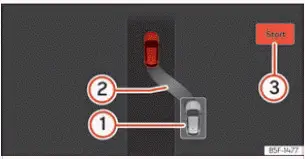
Fig. 159 On the instrument cluster display:
driving off from a parallel space.
- Your vehicle positioned in reverse gear
- Advisory text message giving the proposed manoeuvre to exit the parking space
- Dynamic progress bar indicating the remaining distance to cover
Leaving a parking space (parallel parking)
All necessary operating prerequisites to exit a parallel parking space using Park Assist on your Seat Leon must be fully met before starting.
- Press the virtual menu button in the central infotainment system interface:
 > Assistants. When the system is switched on, the corresponding symbol on the infotainment display screen is highlighted.
- Turn on the directional turn signal toward the side of the road you will enter when pulling out of the parking space.
- Engage reverse gear, or press the dedicated shortcut button
 in the Infotainment system menu.
- Release your hands completely from the steering wheel. Please observe the following prompt on the display:
Automatic steering enabled Pay attention to your surroundings.
While maintaining continuous visual watch over your immediate surroundings, carefully begin accelerating up to a maximum speed of 7 km/h (4 mph). When executing the unparking manoeuvre, the system takes charge exclusively of the steering wheel. You, as the driver, remain entirely responsible for accelerating, operating the clutch pedal if necessary, changing gears, and braking.
- Reverse slowly until the continuous acoustic ParkPilot signal sounds; OR: reverse until the instrument cluster display prompts you to move forward. Progress bar 3 ››› Fig. 159 visualizes the remaining travel distance to cover.
- Depress and hold the foot brake pedal until the Park Assist system finishes making its automated steering wheel corrections; OR: press the brake pedal until the indicator symbol
 goes out on the instrument cluster display screen.
- Move forward cautiously until the continuous ParkPilot tone sounds; OR: move forward until the reverse instruction appears on the instrument cluster display. The Park Assist system will steer your vehicle back and forth as required.
- Your Seat Leon is ready to exit the space completely when a corresponding confirmation message is shown on the instrument cluster, accompanied in certain instances by an audible chime. Take active control of the steering wheel matching the turning angle set by the Park Assist system.
- Scan surrounding traffic carefully and pull out of the parking space into flowing traffic.
 Parking with Park Assist
Before initiating automated parking with your Seat Leon, verify that all system prerequisites have been fully met and that your desired parking mode has been correctly selected.
Parking
Fig. 157 O ...
 Reverse Assist (Rear View Camera)
Introduction
An integrated camera mounted on the rear bumper assists the driver by providing a clear view when reverse parking or manoeuvring your Seat Leon.
The live camera feed is displayed toge ...
See also:
Removing and installing the alternator
Removing and installing alternator - vehicles
with 1.0 l FSI engine
Special tools and workshop equipment required
Torque wrenches - V.A.G 1331-
Torque wrenches - V.A.G 1783-
Removin ...
