
Seat Leon >> Reverse Assist (Rear View Camera)
Introduction
An integrated camera mounted on the rear bumper assists the driver by providing a clear view when reverse parking or manoeuvring your Seat Leon.
The live camera feed is displayed together with dynamic orientation lines projected onto the central Infotainment system screen. A small section of the rear bumper can be seen at the bottom of the image, serving as a reliable physical reference point for the driver.
Reverse assist modes
Depending on the specific equipment and options fitted, the following advanced modes are available:
- Angle parking: aiding reverse parking perpendicular or at an angle to the roadway.
- Trailer towing assist function: specialized guidance to help line up and hitch a trailer.
- Cross traffic: monitors blind zones for crossing traffic during manoeuvres.
Requirements
To park successfully using reverse assist, the following operating requirements must be met:
- Do not exceed a driving speed of approximately 15 km/h (9 mph).
- Parking space width: must equal at least vehicle width + 0.15 m (measured without counting the exterior mirrors).
To display a proper real-time camera image, the following physical conditions must be met:
- The luggage compartment rear tailgate door is completely closed.
- The immediate surroundings and ground surface are relatively flat.
- The vehicle is not heavily overloaded at the rear axle.
WARNING
- Reverse assist cannot precisely calculate exact distances to obstacles, and the inherent technical limits of the system cannot be bypassed. Negligent or overconfident use without due care can lead to serious traffic accidents and personal injuries. The driver must maintain full awareness of surrounding traffic conditions at all times.
- The wide-angle camera lens expands and optically distorts the field of view, displaying objects on the screen differently than they appear in reality.
Perception of depth and absolute distance is also distorted by the camera lens.
- Due to display screen resolution constraints or varying ambient light conditions, certain items may appear blurry or fail to be rendered on screen at all. Exercise extreme caution around thin posts, wire fences, railings, or slender trees that might evade detection on the screen and cause structural damage to your Seat Leon.
- Reverse assist features inherent blind spots where people or low objects cannot be seen by the lens. Continuously monitor the vehicle's entire perimeter directly.
- The camera system is never a substitute for active driver awareness. Supervise every parking manoeuvre and check the vehicle's surroundings visually at all times.
- Do not become distracted from traffic conditions by fixing your gaze solely on the infotainment screen.
- The camera images are strictly two-dimensional. Protruding obstacles, curbside lips, or deep holes in the road surface are much harder to spot or may remain completely invisible on screen.
- Heavy vehicle loading alters the geometric perspective of the projected guidelines. The real-world width represented by the on-screen lines decreases as vehicle load increases. Pay special attention to your surroundings whenever the cabin or boot luggage compartment is heavily loaded.
- In the following driving situations, obstacles or other vehicles may appear deceptively closer or farther away than they actually are. Exercise heightened caution:
- When transitioning from a flat road surface onto an incline or slope, and vice versa.
- When the vehicle is heavily laden with passengers or cargo.
- When your Seat Leon approaches objects that are elevated off the ground or protrude outward. Such objects may fall outside the downward camera viewing angle when reversing.
Note
- It is vital to exercise extreme care and pay close attention if the driver is not yet fully familiar with the camera system's behavior.
- The reverse assist reference lines and trajectory overlays disappear automatically whenever the rear tailgate boot lid is left open.
Connecting and disconnecting
Connect the reverse assist
- With the vehicle ignition switched on, simply engage reverse gear.
- OR: access the central infotainment system interface and select
 > Driver assist > Park assist.
Disconnect the reverse assist
- Drive forward at a sustained forward speed of at least 15 km/h (9 mph).
Shown on the display
The system's graphic functions and on-screen representations may vary slightly depending on your vehicle's specific equipment level.
The camera's perspective and display layout adapt automatically when a factory-fitted tow hitch is electrically connected to a towed trailer.
Reverse assist functions and symbols
When the reverse assist camera view is active on your Seat Leon, you can make various display adjustments using the on-screen function buttons.
Note that some adjustment options are equipment-dependent.
 Exit the current display
 Switch to angle parking
 Switch to the trailer hitching assistance function
 Switch to cross traffic
 Adjust the display: brightness, contrast, and colour
 Switch to park assist
 Display/hide the park assist view
Guide lines
Green horizontal lines: represent the rearward physical extension of your vehicle.
Yellow dynamic lines: show the projected vehicle travel path based on the current steering wheel angle.
Assistance function for hitching a trailer
On Seat Leon variants equipped with a factory-fitted towing device, this specialized function can be used to guide the vehicle precisely close to a trailer tow bar.
Auxiliary alignment lines are projected directly onto the infotainment display.
Green lines: indicate the distance to the trailer hitch, with the spacing between lines representing approximately 0.30 m.
Yellow line: shows the pre-calculated approach trajectory of the trailer hitch depending on steering wheel input.
Cross traffic
This wide-angle view helps monitor cross traffic approaching from the sides behind your vehicle, which is particularly useful when reversing out of tight garage exits or blind driveways.
Angle parking
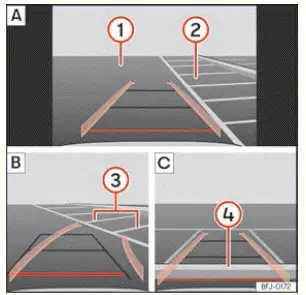
Fig. 160 Display on the infotainment system
display: parking with reverse assist.
Key to ››› Fig. 160:
- Find a suitable parking space
- Maneuver into the selected parking space
- Centre your Seat Leon inside the parking space
- Roadway
- Parking space bay
- Side boundary line of the parking space
- Rear boundary line of the parking space
Parking
- In the infotainment system, select
 > Driver assist > Park assist before passing in front of your chosen parking space.
- With reverse assist connected and operating, press the on-screen function button
 .
- Bring your car to a stop directly in front of the parking space ››› Fig. 160 2 A.
- Reverse slowly while turning the steering wheel so that the projected yellow guidance lines enter the parking space target area.
The green and yellow guide lines must align properly with the side boundary lines 3 B.
- Stop the vehicle completely when the red transverse line reaches the rear boundary marker 4 C.
Troubleshooting
The system behaves differently than expected
Unanticipated system behavior can stem from several potential causes:
- The rear camera lens is dirty. In addition to mud, dust, and packed snow, camera visibility can be impaired by car wash detergent residue or wax coatings.
- The basic operating requirements of the system are not fully satisfied.
- The camera lens surface is obscured by water droplets.
- The factory-fitted towing bracket is electrically connected to a trailer harness.
- The vehicle has sustained localized physical damage around the rear camera housing, such as from a minor parking bump.
- The optical field of view of the camera is physically blocked by an accessory attachment, such as a rear bicycle carrier rack.
- Unauthorized or recent paint touch-ups have been applied near the camera area, or structural modifications have been made to chassis components like the suspension running gear.
Camera with no visibility, fault message, the system disconnects
- Thoroughly clean the camera lens glass or remove any stickers, grime, or obstructions covering it.
- Inspect the housing for visible impact damage.
Possible solution
- Temporarily disconnect and exit the camera system.
- Check whether any of the operational causes listed above apply to your situation.
- Once the source of the issue has been resolved, the reverse assist system can be re-engaged.
- If the system continues to behave unpredictably, have it inspected by an authorized specialized workshop.
 Leaving a parking space with the
Park assist system (only for parallel
parking)
Fig. 159 On the instrument cluster display:
driving off from a parallel space.
Your vehicle positioned in reverse gear
Advisory text message giving the proposed manoeuvre to exit the pa ...
 Rear Cross Traffic Alert
How it works
Fig. 161 Park assist diagram: detected area
around the vehicle that is driving off.
The Park Assist system integrated into your Seat Leon utilizes advanced radar sensors located in t ...
See also:
Differential: Adjust
Special tools and workshop
equipment required
End dimension plate - VW 385/17-
Universal dial gauge bracket - VW 387-
Tightening plate - VW 402-
Tightening plate - VW 401-
Die - VW 408- ...
