
Seat Leon >> Park Distance Control Plus (Park Pilot)
Description
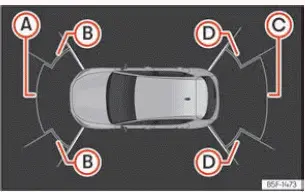
Fig. 154 Park assist view on the Infotainment
system display.
Park Assist Plus aids the driver by providing clear visual and acoustic alerts regarding obstacles detected both in front of and behind your Seat Leon during parking and low-speed manoeuvres.
The front and rear bumpers are fitted with precise ultrasonic sensors. When an obstacle enters the detection zone, its proximity is indicated by acoustic warning beeps and shown visually on the central Infotainment system display ››› Fig. 154.
When steering close to an obstacle, you can easily determine whether the obstruction is located in front of or behind the vehicle based on the pitch and tone frequency of the audio signal.
The approximate measurement ranges of the bumper sensors are as follows:
- Front center area: 1.20 m
- Front side corners: 0.90 m
- Rear center area: 1.60 m
- Rear side corners: 0.90 m
As your Seat Leon gets closer to an obstacle, the pitch frequency of the audible warnings will increase. The signal will sound continuously once the distance shrinks to around 0.30 m: Stop the vehicle immediately! If the vehicle remains stationary at a constant separation distance, the warning signal volume is automatically reduced after approximately 2.5 seconds.
Error messages
If an error or fault message appears on the digital instrument cluster display screen within Park Assist, a system malfunction has been detected.
If the fault does not clear before turning off the ignition, it will not be displayed automatically the next time Park Assist is engaged, but the underlying issue remains.
If a rear sensor is faulty, only obstacles in the front monitoring area are detected. Conversely, if a front sensor is broken or obstructed, only rear obstacles will be displayed. The warning symbol  is displayed on the cluster.
We strongly recommend taking your vehicle to an authorized specialized workshop to have any sensor defects evaluated and repaired.
Trailer mode
On vehicles equipped with a factory-fitted trailer hitch, connecting the electrical harness of a trailer automatically deactivates the rear sensors when reverse gear is selected or when the button  is pressed in the Infotainment system (
 > Assistants). Consequently, objects located behind or to the sides of the vehicle will not be rendered on the display screen, and no acoustic warning signals will sound for the rear area.
The display screen will only show obstacles detected at the front of your Seat Leon, while predicted vehicle trajectory lines will be hidden.
Park assist settings
Visual indications and acoustic warning signals can be customized within the central Infotainment system via the following path: function button  > Assistants > Parking > P > Settings.
- Automatic activation: On/off option to engage sensors automatically at low speeds.
- Front volume: Adjusts signal volume for obstacles detected in the front and surrounding areas.
- Rear volume: Adjusts signal volume for obstacles detected in the rear area.
- Reduce volume: Automatically lowers the current audio source volume when Park Assist triggers, according to your preselected setting.
WARNING
- Always pay close visual attention to surrounding traffic and the immediate environment by looking directly around your vehicle. Driver assistance systems are never a substitute for direct driver awareness. Full responsibility for maneuvering safely always rests with the driver.
- Ultrasonic sensors have inherent blind spots where low obstacles, narrow objects, or small children and animals might not be detected. Pay special attention when maneuvering around toddlers and pets.
- Always keep the surroundings in sight: use all exterior rear-view mirrors for additional assistance.
NOTICE Park Assist Plus functionality can be degraded by environmental factors, potentially leading to vehicle damage:
- Under certain conditions, the system might fail to detect or display specific objects:
- Thin chains, trailer drawbars, thin metal bars, wire fences, narrow posts, or slender trees.
- Objects located above sensor height, such as wall overhangs or elevated loads.
- Objects with complex textures or porous surfaces, such as chain-link mesh or soft powder snow.
- Certain object surfaces, sound-absorbing materials, and heavy clothing fabric do not reflect ultrasonic sensor signals effectively.
The system cannot reliably detect these low-reflectivity objects or people wearing such clothing.
- Ultrasonic sensor signals can be disrupted by loud external noise sources, preventing the system from identifying pedestrians or obstacles accurately.
- If the system alerts you to a low-lying obstacle, note that as your Seat Leon moves closer, the obstacle may drop below the sensor beam angle and disappear from the screen, ceasing warnings. In certain situations, high kerbs or stones that could scrape the vehicle underbody might not be tracked continuously.
- Ignoring parking distance warnings can result in severe structural damage to the bumpers or bodywork.
- Impact damage to the front radiator grille, bumper cover, wheel arches, or underbody can alter sensor alignment, impairing Park Assist function.
Have sensor alignment checked by a specialized workshop following any bumper contact.
- Fitting a oversized number plate frame, or a bent, deformed license plate can obstruct the sensor field of view and trigger false alerts.
Note
- The Infotainment system screen display may exhibit a slight processing time lag.
- In specific scenarios, the system may issue a warning even when no real obstacle exists in the detected area:
- Driving on rough surfaces, cobbles, gravel, or through tall grass.
- Interference from external ultrasound sources, such as air brakes on trucks or other vehicles using parking sensors nearby.
- Driving through heavy downpours, snowfall, hail, or dense exhaust clouds.
- If the front or rear license plate is loose or not mounted flush to the bumper.
- Abrupt gradient changes or steep driveway angles.
- To guarantee reliable operation, keep all bumper sensors clean and free of mud, snow, and ice, and avoid covering them with stickers or accessories.
- When cleaning with high-pressure washers or steam equipment, do not direct spray jets directly at sensors for extended periods, and maintain a minimum working distance of 10 cm.
- Attaching non-standard front accessories, such as custom license plate holders with bulky promotional surrounds, can interfere with Park Assist sensors.
- We recommend practicing parking maneuvers with Park Assist in an open area free of traffic.
- The volume and frequency tone of the acoustic alerts can be customized to your preference.
- Please review all specific operational guidelines regarding trailer towing.
Note On Seat Leon variants not fitted with a central Infotainment system, these parking sensor parameters can be adjusted by a SEAT Official Service dealer or a specialized workshop.
Operating Park Assist Plus
Switching on and off manually
- Press button
 in the central infotainment system interface (
 > Assistants > Parking assist > Park assist).
Automatic activation
- Engage reverse gear on your Seat Leon transmission.
- OR: if you drive forward at a slow speed of less than 15 km/h (9 mph) and approach an obstacle, the system detects it optically when it is approximately less than 95 cm away, or acoustically when it is roughly 50 cm away. When automatic connection is triggered, a simplified reduced display view appears on screen.
- OR: if the vehicle rolls back a certain predetermined distance (ranging between approximately 10 and 20 cm depending on whether a stationary obstacle has been detected).
When Park Assist Plus connects automatically, a top-down graphical diagram of your Seat Leon along with proximity warning segments will appear on screen. This automated function remains enabled unless it has been manually turned off by the driver.
It operates automatically each time vehicle speed drops below the 15 km/h (9 mph) threshold for the first time during a trip.
Automatic activation of park assist can be toggled on and off within the infotainment system menu:
- Switch the vehicle ignition on.
- In the infotainment system settings, select
 > Assistants > Parking > Park assist.
- Check the Automatic activation checkbox option.
If the system is activated automatically in this manner, an acoustic sound warning will only be emitted when front obstacles are at a very close distance of less than approximately 50 cm.
If Park Assist Plus has been manually switched off using the  button on the infotainment screen, one of the following actions must be performed before it will re-engage automatically:
- Turn off the vehicle ignition and switch it back on again.
- EITHER: drive forward at a speed exceeding approximately 15 km/h (9 mph).
- OR: engage or disengage the electronic parking lock button P.
- OR: toggle the automatic activation setting on and off within the Infotainment system menu.
Automatic disconnection
- Accelerate and drive forward at 15 km/h (9 mph) or faster.
- OR: press the electronic parking lock button P.
Temporary mute
- Press the
 function button on the infotainment display screen
- OR: activate the electronic parking brake manually.
Change from reduced view to full view
- Engage reverse gear if your Seat Leon is equipped with a rear-view parking camera.
- Press the virtual car icon displayed on the reduced view window.
- OR: allow the vehicle to roll back a specific distance (between approximately 10 and 20 cm depending on obstacle detection status).
Switch to the reverse assist image (Rear View Camera "RVC")
- Select reverse gear.
- OR: press the RVC camera icon button on the Infotainment system display screen.
A brief confirmation tone will be heard, and the button symbol will illuminate to confirm when the system is successfully switched on.
NOTICE Park Assist Plus only connects automatically when the car is moving at very low speeds. If your driving speed or style is not properly adapted to prevailing traffic circumstances, a collision can occur, leading to serious personal injury or severe vehicle damage.
Visual indication segments
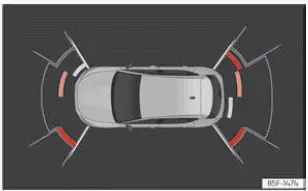
Fig. 155 Park assist view on the Infotainment
system display.
The optical color indication of the warning segments functions as follows:
- Grey segments: the detected obstacle is more than approximately 30 cm away from the vehicle's path or is located in the direction opposite to travel. Grey segments are also displayed whenever the electronic parking brake is active.
- Yellow segments: the obstacles lie directly in the travel path of your Seat Leon and are at a distance of less than approximately 30 cm away.
- Red segments: critical obstacles are less than approximately 30 cm away from your vehicle.
A dynamic guiding track overlay indicates the anticipated forward or backward trajectory of your Seat Leon, depending on whether a forward gear or reverse is currently engaged.
If an obstacle is located directly in the vehicle's driving path, the corresponding acoustic warning beep will sound.
When the penultimate warning segment is displayed on screen, your car has reached the immediate collision zone. Within the collision zone, all close obstacles are shown in red (including those located outside the predicted wheel trajectory). Stop the vehicle immediately! ››› in Description on.
 General information on parking systems
Automatic brake operation
The automatic braking feature integrated into the parking systems of your Seat Leon is engineered to reduce the danger of a collision when an unexpected obstacle is detected ...
 Rear park assist
Description
Rear park assist is an intelligent visual and audible assistant integrated into your Seat Leon that warns you of obstacles located directly behind the vehicle during reverse manoeuvring.
...
See also:
Opening the bonnet
The bonnet is released from inside the vehicle.
Fig. 141 Detail of the foot
well: The release lever for
the bonnet is located in
the driver side foot well
Fig. 142 Arrester hook
for bonnet.
...
