
Seat Leon >> Cruise control system
Introduction
The cruise control system (GRA) helps you maintain a constant, preselected driving speed effortlessly on your Seat Leon, enhancing comfort on long journeys.
Speed range
The electronic cruise control system is available when driving in a forward gear at a stable speed exceeding approximately
20 km/h (15 mph).
Temporarily switching off the cruise control
The currently saved cruising speed can be exceeded at any time by pressing the accelerator pedal—for instance, when overtaking another vehicle. Cruise control regulation is temporarily suspended during acceleration and will automatically resume at the previously saved speed once you release the throttle.
Status display
When the cruise control system is switched on, the instrument cluster screen displays the currently saved target speed alongside the active system status indicator:
 Lights up in grey.
The cruise control system is switched on, but speed regulation is currently in standby and not active.
 Lights up in green.
The cruise control system is switched on and speed regulation is actively engaged.
If there is no target speed currently stored in memory, the instrument cluster display will show three dashes (---) instead of a numerical speed value.
Changing gears
As soon as the clutch pedal is depressed on a manual transmission model, cruise regulation is temporarily suspended and will resume automatically once the gear change has been completed.
Driving down slopes
When descending a long hill or steep mountain grade, manually shift into a lower gear beforehand. This allows you to harness the engine braking effect, relieving the mechanical wheel brakes and preventing overheating.
The vehicle cannot maintain a perfectly constant saved speed under all driving circumstances or steep gradients. Always remain alert and be ready to apply the vehicle's foot brakes.
WARNING If prevailing road geometry or traffic density makes it impossible to maintain a safe braking distance and a steady speed, utilizing the cruise control system inappropriately can lead to serious accidents and severe injuries.
- Do not use Travel Assist or cruise control when visibility is severely impaired, on winding mountain roads, on slippery surfaces (such as packed snow, black ice, heavy rain, or loose gravel), or when driving through flooded road sections.
- Only use the cruise control system on paved public roads with a firm, solid surface.
- Always adapt your driving speed and safety following distance relative to the vehicle ahead to match current visibility, weather conditions, road surfaces, and traffic flow.
- After use, always switch off the cruise control or speed limiter system to prevent vehicle speed from being regulated against your active intentions.
- Selecting a stored cruising speed that is too high for prevailing road, traffic, or weather conditions creates a major safety hazard.
Operating the cruise control
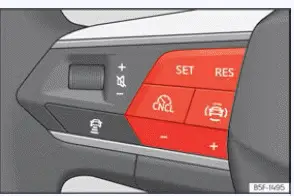
Fig. 133 On the multifunction steering wheel:
cruise control operation buttons.
Connecting
- Press the
 button on the steering wheel controls.
Next, select "Cruise control" directly from the driving assistants menu on your display.
At this stage, speed regulation has not yet taken place until activated.
Start regulation
- While driving your Seat Leon forward, press the set button
 .
The cruise control system instantly saves and begins regulating your current vehicle speed.
Adjusting the speed
While the GRA cruise control system is active, the stored target speed can be fine-tuned using the following increments:
 + 1 km/h (1 mph)
 - 1 km/h (1 mph)
 + 10 km/h (5 mph)
 - 10 km/h (5 mph)
Interruptingкха the adjustment
- Briefly press the cancellation button
 or firmly press down on the brake pedal.
The current target speed remains safely stored in system memory.
Reinstating the cruise control
- Press the resume
 button.
The cruise control system will seamlessly resume the saved speed and resume active speed regulation.
Troubleshooting
 Fault in the speed regulator
The control lamp lights up in yellow on the dash.
Abnormal system operation has been detected. Switch off the cruise control system immediately and take your Seat Leon to a specialized workshop for inspection.
The adjustment is interrupted unexpectedly
- If the clutch pedal is held down or pressed for an extended period of time.
- If the vehicle has exceeded the saved target speed for a prolonged duration (e.g. while overtaking).
- If no forward gear is currently engaged.
- If an active stability or brake assistance system, such as TCS or ESC, has intervened.
- If Front Assist has automatically braked the vehicle.
- If the fault persists, temporarily disable Emergency Assist and consult a specialized workshop.
 Drive assist sensors and cameras
Front radar
Fig. 127 On the front bumper: front and side
radar sensors.
Fig. 128 Detection area.
Your Seat Leon may be fitted with high-precision radar sensors embedded discreetly into the fro ...
 Speed limiter
Introduction
The integrated speed limiter function helps the driver ensure they do not unintentionally exceed a programmed maximum speed limit.
Speed range
The speed limiter helps avoid exceeding a ...
See also:
1.2l and 1.4I TSI engines
Removing
Remove air hose -2- from air mass sensor upper section -1-.
Open hose clips -3- and -4-.
Lift air filter housing -1- off upwards from the ball studs.
Remove the air conduit ducts -1 ...
