
Seat Leon >> Speed limiter
Introduction
The integrated speed limiter function helps the driver ensure they do not unintentionally exceed a programmed maximum speed limit.
Speed range
The speed limiter helps avoid exceeding a programmed speed limit, starting from approximately 30 km/h (20 mph) and upwards.
Selecting the speed limiter
The active speed limit can be overridden and interrupted at any time by depressing the accelerator pedal all the way down past the full-throttle resistance point. As soon as the saved speed threshold is exceeded, the green indicator light flashes and an audible warning signal may sound to alert the driver. The original speed limit remains stored.
The limiter will reactivate automatically once your Seat Leon drops back down below the programmed speed threshold.
Status display
When the speed limiter is switched on, the instrument cluster display shows the saved speed limit and the current system status:
 Lights up grey
The speed limiter is switched on, but speed regulation is currently in standby and not active.
 Lights up green
The speed limiter is switched on and actively regulating.
Driving down slopes
When descending a long hill or steep incline, shift into a lower gear beforehand. This harnesses the engine braking effect, relieving the mechanical wheel brakes and preventing overheating.
The vehicle cannot maintain the saved speed limit on every steep driving grade. Always remain attentive and be ready to apply the vehicle's brakes.
WARNING After use, always switch off the speed limiter system to prevent vehicle speed from being regulated against your active wishes.
- The speed limiter does not relieve the driver of their fundamental legal responsibility to drive at an appropriate and safe speed. Never drive at high speeds if local conditions do not warrant it.
- Using the speed limiter under adverse weather or road conditions is dangerous and can cause serious accidents—such as aquaplaning on water, sliding on snow or ice, or slipping on wet leaves. Only use the speed limiter when road surfaces and weather conditions safely allow it.
Operating the speed limiter
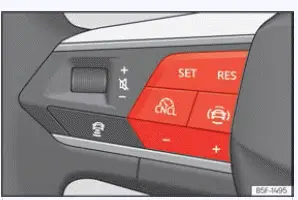
Fig. 134 On the multifunction steering wheel:
buttons to control the speed limiter.
Connecting
- Press the
 button.
Next, select "Speed limiter" from the driving assistants menu.
Speed regulation has not yet taken place.
Start regulation
- While driving your Seat Leon, press the set button
 .
Your current driving speed is instantly saved as the active limit speed.
Adjusting the speed
The programmed speed limit can be adjusted precisely using the following steps:
 + 1 km/h (1 mph)
 - 1 km/h (1 mph)
 + 10 km/h (5 mph)
 - 10 km/h (5 mph)
Interrupting the adjustment
- Press the
 button.
The speed limit is stored safely in memory.
Reinstating the cruise control
- Press the
 button.
The limiter will re-activate automatically as soon as the vehicle is moving at a speed lower than the saved target threshold.
Troubleshooting
 The speed limiter is not available
The control lamp lights up in yellow on the instrument cluster.
- Malfunction detected: Switch off the speed limiter function and bring your vehicle to a specialized workshop for diagnosis.
Regulation is interrupted unexpectedly
- The vehicle friction brakes have overheated due to heavy use. Wait for the brake system to cool down completely and check the operation of the limiter again.
- If the functional fault continues, consult an authorized specialized workshop.
 Cruise control system
Introduction
The cruise control system (GRA) helps you maintain a constant, preselected driving speed effortlessly on your Seat Leon, enhancing comfort on long journeys.
Speed range
The electronic ...
 Speed limiter with proactive speed adjustment
Introduction
The advanced speed limiter with proactive speed adjustment on your Seat Leon is designed to automatically adapt a maximum speed limit that you have previously saved to match detected, ch ...
See also:
Removing and installing brake splash
plate
Removing:
Dismantle brake disc.
Unscrew screws -arrows- of splash plate -1-.
Remove splash plate -1- from the wheel hub.
Installation:
Clean wheel hub and splash plate.
Fit splash pla ...
