
Seat Leon >> Air Conditioning Menu
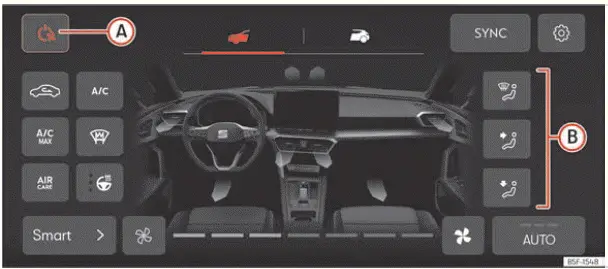
Fig. 115 Schematic representation: Air
conditioning menu.
The following advanced climate control functions and submenus are available within the central Air Conditioning menu of your Seat Leon, depending on the specific equipment configuration:
 Front submenu
Dedicated submenu for controlling the heating, ventilation, and air conditioning across the front section of the vehicle interior, where you can easily access the following features:
 Switching the Climatronic climate system entirely off or on.
 Synchronizes all cabin temperature settings to match the exact temperature value selected in the driver's zone. To deactivate synchronization, simply adjust the temperature setting for the front passenger zone and/or rear zone independently. This activates individual temperature control for the passenger side ››› Fig. 114 2 and/or rear cabin zone.
 The dynamic color of the airflow arrows shown in the graphic of the vehicle interior indicates the target temperature requested based on prevailing ambient conditions, rather than the physical temperature of the air leaving the vents.
The desired air outlet distribution direction can be selected manually using the designated touch buttons ››› Fig. 115 B.
 Switching manual cabin air recirculation on and off.
 Manual steering wheel heating setting featuring three distinct thermal intensity levels. Tap the function
 button repeatedly to cycle through and select your desired warmth level. To turn heating off completely, press the button multiple times until no indicator LEDs remain lit.
 Switch the main air conditioning cooling compressor system on and off.
 Switch maximum air conditioning cooling output on and off. When activated, air recirculation mode engages automatically and the Climatronic system directs maximum chilled airflow toward the upper body.
 The ventilation system of your Seat Leon incorporates an advanced high-efficiency filter capable of reducing allergen contaminants and fine particulate matter.
The intelligent Air Care function automatically engages air recirculation and regulates it continuously and seamlessly as long as optical sensors detect no risk of interior window misting.
Detailed status information  regarding the active Air Care purification system can be found within the Settings submenu.
 Manual adjustment of the blower fan speed by tapping directly on the level indicators.
OR: by pressing  or
 , or sliding your finger smoothly along the slider lines until your desired fan blower speed is reached.
 In Auto mode, the Climatronic system automatically regulates interior cabin temperature, blower fan speed, and air distribution patterns to ensure optimal thermal comfort. The
 operating mode will deactivate automatically as soon as any manual adjustments are made to fan speed, air distribution targets, windscreen demisting, or air recirculation.
Repeatedly pressing the ventilation mode button  sets the automatic blower profile to gentle, medium, or high airflow intensity levels.
Smart submenu
An intelligent submenu housing various automated smart climate profiles and convenience functions, depending on the vehicle's equipment version:
 Hand warm: automatically adjusts climate control parameters for a preset duration to direct warm air specifically through the upper dashboard front vents.
 Cool feet: automatically adjusts airflow for a limited time to cool down the lower footwell floor areas.
 Demist the windscreen: automatically configures airflow and compressor settings for a specific duration to rapidly clear condensation off the front windscreen.
 Warm feet: automatically adjusts the climate system for a set time to heat the footwell areas efficiently.
 Fresh Air: automatically adjusts ventilation parameters for a set time to exchange and refresh cabin air with outside air.
 Fast cooling: automatically drives maximum cooling output to rapidly ventilate and cool down the interior of your Seat Leon for a specified duration.
 Rear submenu
Submenu dedicated to managing the air conditioning in the rear cabin area of the vehicle, providing access to the following controls:
 Rear control lock: when activated, passengers sitting in the rear cannot alter temperature or fan settings from the rear console controls.
 Press to precisely adjust the target temperature for the rear cabin passenger zone.
 Settings submenu
Submenu containing system-wide configuration preferences, including:
- Heated steering wheel automatic activation at journey start based on ambient temperature: select one of the three heating intensity levels or choose Off from the interactive dropdown menu.
 Climatronic control
Fig. 114 Schematic representation: airconditioning
functions.
Climabar
The Climabar is a fixed, dedicated touch status bar located permanently along the bottom edge of the Infotainment ...
 Rear controls
Fig. 116 In the centre console, rear section:
controls for the rear seats
Temperature selection
Press buttons 1 and 2 ››› Fig. 116 to precisely adjust
the target climate temperat ...
See also:
Tasks to be completed on the vehicle
exterior
The vehicle is supplied from factory equipped with a series of
protective covers fitted on the outside of the vehicle, designed to
protect the vehicle during transportation and storage. Certain
par ...
