
Seat Leon >> Climatronic control
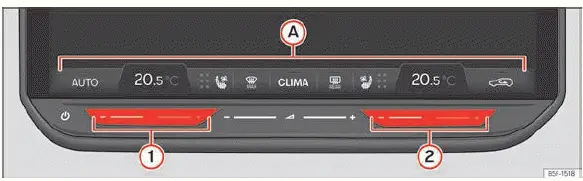
Fig. 114 Schematic representation: airconditioning
functions.
- Climabar
The Climabar is a fixed, dedicated touch status bar located permanently along the bottom edge of the Infotainment System display ››› Fig. 114 A, providing instant access to the core climate control functions of your Seat Leon:
Temperature Tapping directly on the numerical temperature values opens a convenient pop-up window allowing precise temperature adjustments using the on-screen plus (+) or minus (-) touch symbols.
OR: you can use the dedicated exterior touch slider zones 1 and 2 (color-coded blue for cooling and red for heating) to adjust cabin temperature directly ››› Fig. 114. Alternatively, temperature can be modified smoothly by swiping your finger horizontally from right to left or left to right across these touch strips.
 Tap on this symbol to cycle through or change the seat heating intensity level. To turn off seat heating completely, press the button repeatedly until all indicator light levels are off. Seat heating can also be managed via the main vehicle Seats menu.
OR: seat heating can be activated quickly by tapping simultaneously with two fingers at once on touch zones 1 (for the driver) and 2 (for the front passenger) on equipped models.
 The Max Defrost windshield demist
function of the Climatronic system rapidly
clears ice, frost, and condensation
from the windscreen glass. Intake air is heavily dehumidified and the blower fan ramps up to high speed.
This defrost function can also be accessed directly from the physical dashboard light control panel.
When maximum windscreen defrosting is switched on, any rear climate control activity remains temporarily deactivated.
 Press this icon to open the full subsidiary Air Conditioning control
menu on the touchscreen.
 Switches the electric rear window defogger heating on or
off whenever the engine is running. It deactivates automatically after a maximum operating duration of 10 minutes.
The driver should switch the rear heater off manually as soon as the glass surface is clear of mist. The vehicle energy management system can also temporarily inhibit this function to protect the 12-volt battery from deep discharge under heavy electrical loads.
Normal heating function is restored automatically as soon as battery charge levels permit.
This rear window heating function can also be operated via the main dash light control panel.
Favourites (depending on the equipment)
With the exception of the master temperature selectors and the individual seat heating
buttons  and
 , most of the remaining shortcut buttons on the Climabar
can be customized to your personal preferences:
1. Press and hold down the specific button on the Climabar that you wish to reconfigure. A drop-down selection window displaying all available shortcut options will appear on screen.
2. Tap on your desired function option to assign it instantly to that button slot.
3. Close the selection box to return to the main infotainment climate interface.
 Introduction
Depending on your vehicle's specific equipment variant, the heating, ventilation, and climate control system on your Seat Leon includes:
1-zone Climatronic: heats, ventilates, cools,
and d ...
 Air Conditioning Menu
Fig. 115 Schematic representation: Air
conditioning menu.
The following advanced climate control functions and submenus are available within the central Air Conditioning menu of your Seat Leon, de ...
See also:
Switching the cruise control system on and off
Fig. 125 Turn signal and
main beam lever: Switch
and rocker switch for CCS
Switching on the system
– Push the switch fig. 125 B to the left to ON.
Switching off the system
– Either p ...
