
Seat Leon >> Unlocking and locking from the inside
SEAT Leon (4th Generation, KL; 2020+) Owner’s Manual / Opening and closing / Central locking / Unlocking and locking from the inside
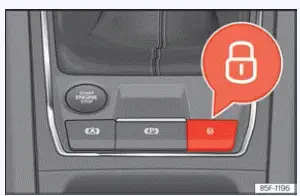
Fig. 76 On the centre console: central locking
button
- Lock: press the
 button ›››
Fig. 76.
- Unlock: Press the
 button
››› Fig. 76 again to open access.
Please note the following important operational details when using the central locking button to secure your Seat Leon from inside:
- It is impossible to open any of the doors or the rear lid from the outside when this mode is active (useful for safety reasons, e.g., when stopped temporarily at traffic lights).
- The central locking button indicator lamp lights up solid when all side doors are completely closed and locked.
- You can open the individual doors manually from the inside at any time by pulling twice on the respective interior door handle.
- The fuel tank flap remains unlocked during normal interior locking.
Hybrid vehicles: the fuel filler cap remains securely locked.
- In the unfortunate event of a collision where the vehicle airbags inflate, doors locked from the inside will be unlocked automatically to facilitate emergency access and quick rescue assistance.
WARNING
- The central locking button also functions with the engine ignition switched off, except when the advanced "Safe" security system is actively turned on.
- The interior central locking button does not operate if the vehicle has been previously locked securely from the outside and the electronic security system is fully switched on.
- Doors locked from the inside could significantly delay rescue assistance in an emergency situation. Never leave anyone, especially vulnerable children or pets, unattended inside the vehicle.
Note
Your vehicle will lock automatically when it
reaches a moving speed of approximately 15 km/h
(9 mph) (Auto Lock). You can
unlock the vehicle again using the  key of
the central locking button on the console.
 Unlock and lock with the key
Fig. 75 Remote control key: buttons.
Lock: press the button ›››
Fig. 75 to secure your Seat Leon.
To lock the vehicle without the "Safe" security
system engaged, pres ...
 "Safe" security system
Depending on its specific trim equipment package, your Seat Leon may
be fitted with the advanced "Safe" security system.
When the vehicle is locked, the "Safe" security
system puts the exterior a ...
See also:
Speed warning function warning levels
If the system detects that the active speed limit has been exceeded while driving your Seat Leon, it provides an immediate visual alert on the instrument cluster display by flashing the recognized spe ...
