
Seat Leon >> Speed warning function warning levels
If the system detects that the active speed limit has been exceeded while driving your Seat Leon, it provides an immediate visual alert on the instrument cluster display by flashing the recognized speed limit value. Depending on the vehicle's electronic configuration, an audible warning chime will also sound. This speed alert system operates progressively across two distinct levels.
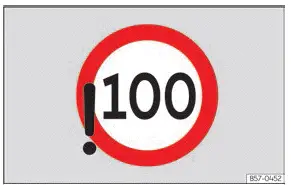
Fig. 9 On the instrument cluster display:
violation of the detected speed limit
(illustration).
Speed warning - Level 1
Speed limit violation detected. The specific speed limit registered by the system flashes continuously on the instrument cluster screen and, depending on the fitted equipment package, on the front infotainment display ››› Fig. 9.
Speed warning - Level 2
Progressive and sustained violation of the established speed limit has been detected.
An acoustic warning signal sounds in the cabin. The speed limit value detected by the system flashes continuously on the instrument cluster display and, depending on the active equipment level, on the front display screen ››› Fig. 9.
Note
- The second warning level is triggered automatically if the vehicle speed remains above the recognized limit for a sustained duration.
- The second warning level is cancelled and switches off once the driver actively decelerates and brings the vehicle speed back below the legal limit.
Troubleshooting
 Advanced road sign
recognition is
not available
A yellow control lamp appears on the instrument cluster display in combination with the central yellow master warning light. An explanatory text message is also shown on the instrument cluster screen and within the vehicle status menu.
Road sign detection system troubleshooting messages:
- "Dynamic road sign assist: please clean
the windscreen."
- The windscreen glass is dirty or obscured in the immediate field of view of the camera, or the camera vision is impaired by adverse weather conditions. Clean the windscreen thoroughly.
- The camera's line of sight is obstructed by mounted accessories, toll tags, or aftermarket stickers. Keep the glass area around the camera completely clear.
- The camera module has shifted or suffered physical damage, for example due to a cracked windscreen.
Check the glass carefully to see whether external damage is visible.
- "Error: dynamic road sign assist"
- A functional fault has occurred in the system. Have the system checked and diagnosed by a specialized workshop.
- "Speed warning is currently unavailable"
- The speed warning subsystem of the road sign recognition unit is reporting a fault. If the issue persists, have the system inspected by a specialized workshop.
- "Dynamic road sign assist currently restricted"
- The onboard navigation system is failing to transmit necessary map data. Verify whether the navigation system has up-to-date map versions installed.
- OR: the vehicle is currently operating in a geographic region not covered by the navigation system's stored map database.
If the problem persists, have the system inspected by a qualified workshop.
Outside the operating region for advanced road signs recognition
A notification message appears on the instrument cluster display reading: "Road sign assist: outside the usage area".
- No map data is available for this region. The advanced road signs recognition system is not supported in the country or zone you are currently driving through.
 Speed warning system
partially deactivated
A white control lamp lights up on the instrument cluster display. This indicates that the factory default configuration of the speed warning function has been altered:
- Check whether the speed warning feature has been switched off.
- Check if the audible warning chime is active.
- Check whether the default speed warning threshold has been modified.
 Driving with the speed warning function
Operating conditions
The speed warning function provides active alerts whenever your Seat Leon travels at speeds exceeding 20 km/h.
Connection and disconnection
Depending on regional market regulat ...
 Instrument cluster operation
Introduction
With the vehicle ignition switched on, you can easily access and read the various operational functions of the display by scrolling smoothly through the onboard menus.
In vehicles equip ...
See also:
Indications for the driver on the instrument
cluster display
Depress the clutch
This advisory message is displayed on Seat Leon models equipped with a manual gearbox whenever the driver attempts to start the engine without pressing down on the clutch ped ...
