
Seat Leon >> Instrument cluster operation
Introduction
With the vehicle ignition switched on, you can easily access and read the various operational functions of the display by scrolling smoothly through the onboard menus.
In vehicles equipped with a multifunction steering wheel, the multifunction display can be operated exclusively using the physical control buttons on the steering wheel spokes.
Certain detailed menu options and settings can only be accessed and read when the vehicle is brought to a complete standstill.
Instrument panel menus
The total number of available menus and information items depends entirely on the specific electronic architecture and equipment features fitted in your Seat Leon.
- Vehicle status
- Driving data
- Assist systems.
- Front Assist On/Off
- ACC (display only)
- Lane Assist On/Off
- Travel Assist
- Side Assist On/Off
- Speed warning On/Off
- Navigation.
- Audio.
- Telephone.
WARNING Distracting the driver in any way while operating the vehicle can lead to an unexpected accident and cause severe physical injuries.
- Never use or navigate the menus on the instrument panel display while the vehicle is in motion.
NOTICE Following maintenance, charging, or replacing the 12-volt battery in your Seat Leon, always check your system settings. If the electrical power supply is interrupted, stored system settings may become incorrect or deleted entirely.
Operation using the multifunction steering wheel
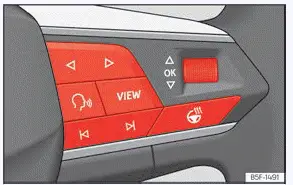
Fig. 10 Right side of multifunction steering
wheel: buttons to the menus and informative
indications on the instrument panel (depending
on the version).
As long as a critical priority 1 warning message remains active on your Seat Leon, accessing any auxiliary menu is temporarily restricted. Certain active warnings can be confirmed and hidden from view by pressing the  button located on the multifunction steering wheel ››› Fig. 10.
Select a menu or an informative display
- Switch the vehicle ignition on.
- If an active warning message or vehicle status symbol is currently displayed, press the
 button ››› Fig. 10 several times if necessary.
- To switch between different available menus, use the horizontal or vertical arrow buttons.
- To open a specific menu or view the requested information, press the
 button or simply wait a few seconds until the selected menu or informative screen opens automatically.
Changing menu settings
- Within the active menu display, rotate the right-hand thumbwheel of the multifunction steering wheel up or down until your desired option is highlighted.
The selected option will appear framed on the screen.
- Press the
 button to execute required modifications.
A checkmark indicator confirms that the corresponding system or function is activated.
Back to menu selection
- Press the
 or
 button to return to the upper menu level.
 Speed warning function warning levels
If the system detects that the active speed limit has been exceeded while driving your Seat Leon, it provides an immediate visual alert on the instrument cluster display by flashing the recognized spe ...
 Infotainment system operation and displays
Introduction
The advanced infotainment system in your Seat Leon centralizes vital vehicle functions and electronic systems into a single intuitive control unit, managing climate control settings, aud ...
See also:
Removing and installing front body acceleration
senders -G341- / -G342-
Special tools and workshop equipment required
Torque wrenches - V.A.G 1410-
Removing
Pull seal off entire length of plenum chamber cover.
Unclip the filler piece.
Unhook the clips -2- ...
