
Seat Leon >> Media Mode
Introduction
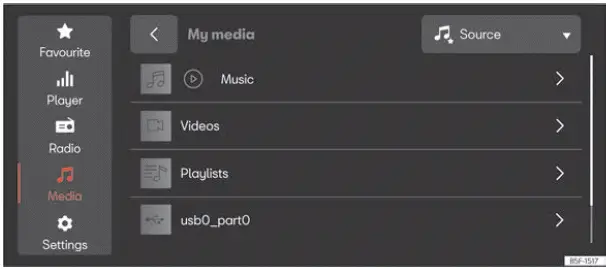
Fig. 174 Schematic representation: Media view
In Media mode, you can play your favorite multimedia files directly from connected data storage media through your Seat Leon infotainment system.
Depending on the vehicle's specific equipment package, the following types of data storage media can be utilized:
- USB storage devices (such as a USB flash drive or a mobile phone connected via a USB cable).
- Bluetooth audio streaming devices (for example, a paired mobile smartphone or tablet).
Depending on your infotainment system configuration, the following classes of multimedia files can be played back:
- Audio files.
- Video files (availability depends on the specific system version).
Access the MEDIA menu
- Press MENU >
 >
 ››› Fig. 174.
Access the settings
- Press MENU >
 >
 .
Data media limitations and indications
External data storage media may fail to function correctly if they have been subjected to excessive ambient temperatures or physical damage.
Please always observe and follow the technical specifications and instructions provided by the manufacturer of your storage media.
Variations in build quality between data media produced by different manufacturers can occasionally lead to multimedia playback glitches or reading errors.
Incorrectly formatted data media or improper file structures may render the storage unit unreadable by the system.
Playlists only define a specific playback sequence and point to the physical storage locations of multimedia files within the folder hierarchy. No actual media files are stored inside a playlist itself. To play a playlist successfully, the referenced multimedia files must reside in the exact storage locations on the data medium that the playlist points to.
Note SEAT assumes no legal liability whatsoever for any potential file corruption, deterioration, or permanent loss of data occurring on connected storage devices.
 Radio mode
Introduction
Fig. 173 Schematic representation: Radio view.
In Radio mode, you can tune into available radio broadcasts across different frequency bands and save your favorite stations onto preset ...
 Navigation
Introduction
Fig. 175 Schematic representation: Navigation
view.
A global satellite navigation system continuously determines the exact geographic position of your Seat Leon, while vehicle-mounte ...
See also:
Removing and installing attachments
Removing and installing lock carrier
cover
Special tools and workshop equipment required
Release lever - 3409-
Removing
Lift the front bonnet. Use the rod to keep it open.
Remove cove ...
