
Seat Leon >> Settings (system and sound)
The range of configurable settings available may vary depending on regional market specifications and the equipment fitted to your Seat Leon.
Modifying settings
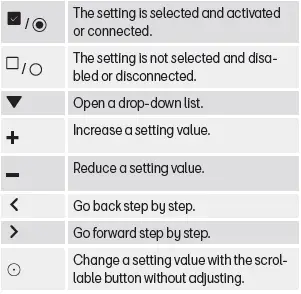
The operational meaning of the symbols described below applies universally across all system and sound settings menus.
All adjustments made are applied automatically as soon as you exit or close the respective menu.
Sound settings
- Access the sound settings menu:
 >
 .
Depending on your audio package, the sound settings menu may include the following functions and adjustment options:
- Equaliser.
- Position.
- Settings.
System settings
- Access the system settings menu:
 >
 .
The system settings menu provides access to the following functions, information panels, and configuration options:
- Screen.
- Time and date.
- Language.
- Additional keypad languages.
- Units.
- Voice control.
- Wi-Fi.
- Data connection.
- Manage mobile devices.
- Restore factory settings.
- System information.
- Copyright.
- Configuration wizard.
Adjust the volume of external audio sources
If you need to increase the playback volume for an external audio source connected to your Seat Leon, make sure to first lower the master volume setting on the infotainment system to avoid sudden sound bursts.
If the sound output from the connected media source is very quiet, increase the volume directly on the external device. If this adjustment is insufficient, change the auxiliary input volume setting in the car to medium or high.
If the audio output coming from the connected external source is excessively loud or distorted, lower the volume on the external device. If distortion persists, change the infotainment input volume setting to medium or low.
Clean the screen
Remove fingerprints, smudges, and persistent dirt carefully without using harsh chemical cleaning products. To clean the touchscreen safely, we recommend that:
- The infotainment system is completely switched off.
- You use a clean, soft microfiber cloth slightly dampened with plain water.
- In the case of stubborn dirt: moisten the cloth with a small amount of water and wipe the screen gently using minimal pressure.
NOTICE Cleaning the display while dry or using unsuitable chemical cleaning agents can cause permanent damage to the glass and touchscreen coating.
- Apply only light pressure when wiping the display surface.
- Never use aggressive cleaning products, alcohol-based solvents, or window cleaners. Such substances can degrade the screen coating and permanently darken or ruin the display.
 Managing the infotainment system
You can execute all vehicle functions and adjust system preferences using the dedicated controls of your Seat Leon infotainment unit.
Depending on the specific equipment and model trim, the infotai ...
 Trademarks, licenses and copyrights
Registered trademarks and licenses
Certain product names and terms in this manual bear registered trademark symbols. These designations indicate that the corresponding items are protected trademarks ...
See also:
Exploded view - underbody trim
- Bolt.
1 + 1 each
2 Nm
- Guard for the window lifter
bracket
Left-side
Removing
Unscrew the screw and
release the locking elements
of the side at the
rear.
...
