
Seat Leon >> Electronic parking brake
Using the electronic parking
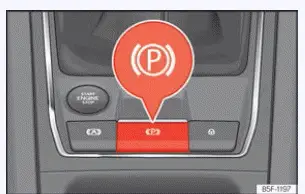
Fig. 152 Centre console, lower part: electronic
parking brake button.
Connecting
The electronic parking brake in your Seat Leon can be manually activated whenever the vehicle is at a standstill, even when the ignition is switched off completely. Always engage it whenever you exit or park the vehicle to prevent accidental rolling.
- Pull up and hold the switch button
 ››› Fig. 152.
The parking brake is fully engaged when the red indicator lamp
 on the instrument cluster and the indicator lamp on the console switch itself turn on.
- Release the button once the red indicators light up.
Switching off
- Switch the ignition on.
- Press the switch button
 ››› Fig. 152. At the same time, step down firmly on the foot brake pedal or, if the engine is running, depress the accelerator pedal slightly.
- The indicator lamp on the switch button and the red indicator lamp
 on the instrument cluster turn off, indicating that the brakes are fully released.
Automatic disconnection when moving off
The electronic parking brake automatically disconnects and releases when moving off in any of the following drive scenarios, provided that the driver's door is securely closed and the driver's seatbelt is fastened:
- On vehicles equipped with an automatic gearbox: A gear position (D, R, or Manual mode) is engaged or selected, and the driver lightly depresses the accelerator pedal.
On vehicles equipped with a manual gearbox: Fully depress the clutch pedal before moving off and gently depress the accelerator pedal while letting out the clutch.
- To facilitate certain tight parking manoeuvres or hitching operations, there are technical exceptions that allow the parking brake to disconnect automatically without the driver's seatbelt being buckled.
You can actively prevent the parking brake from releasing automatically when moving off by continuously pulling up on the
 switch during acceleration.
The electronic parking brake will not disconnect until the  switch is released. Holding this switch can greatly facilitate starting off on steep inclines when your Seat Leon is towing a heavy trailer load.
Automatic application when exiting the vehicle incorrectly
In vehicles with automatic transmission, the electronic parking brake may be applied automatically if the system detects an improper or unsafe attempt to exit the vehicle. For example:
- the seat sensor detects no driver presence,
- the driver's seat belt is unfastened,
- the driver's door is opened.
The electronic parking brake also holds your Seat Leon securely in place when the transmission is left in neutral (N position).
WARNING If the vehicle is left improperly secured, it could roll away unexpectedly. This can lead to severe accidents, personal injury, and extensive property damage.
- When parking your Seat Leon, always perform the appropriate securing procedures in the exact order indicated.
- Before exiting the vehicle, always double-check that the electronic parking brake is fully applied and that the red control lamp next to the gear selector and on the instrument cluster is illuminated.
Protection against unintentional movement
If you wish to prevent the electronic parking brake on your Seat Leon from applying automatically—such as when entering an automated car wash, or when the vehicle needs to be pushed or towed—the car's ability to roll freely can be intentionally maintained.
Deactivation procedure: With the vehicle at a complete standstill, depress the service brake pedal firmly and shift the transmission gear selector into the neutral N position.
- Confirm the advisory prompt reading Deactivate roll-away protection on the central infotainment system screen.
- OR: access the vehicle configuration settings in the infotainment system via
 > Vehicle > Brakes > Deactivate the "Roll-away protection function".
Activation procedure:
- Press down the switch button
 ››› Fig. 152. The electronic parking brake is re-engaged immediately.
NOTICE Your Seat Leon may remain capable of rolling freely even after the ignition has been switched off if roll-away protection was deactivated.
Automatic connection when the ignition is turned off
This convenient automatic application feature can be customized and deactivated through the central Infotainment system settings if desired.
On vehicles equipped with a manual gearbox, the electronic parking brake is activated automatically as a safety measure every time the ignition is turned off.
Emergency brake function
The emergency brake function should only be utilized in an extreme emergency—such as if the primary service brake pedal system fails and the vehicle cannot be stopped normally.
- Pull and hold up the
 switch button. Your Seat Leon will decelerate sharply and forcefully. Simultaneously, an urgent warning chime will sound in the cabin.
- To interrupt and stop the emergency braking process, release the switch button or press down on the accelerator pedal.
WARNING Improper, careless, or unnecessary use of the electronic parking brake while driving can cause sudden skidding, traffic accidents, and serious personal injury.
- Never use the electronic parking brake to bring the vehicle to a halt during normal driving, unless it is a genuine emergency.
The resulting emergency braking distance is considerably longer and less controlled than using the foot brake.
Always rely on the service brake pedal for standard stopping.
- Never rev the engine or accelerate heavily while a gear range or manual gear is engaged and the engine is running while holding the car with the parking brake. Your Seat Leon could start moving unexpectedly even with the electronic parking brake applied.
NOTICE To prevent your Seat Leon from shifting or moving unintentionally when parking on an incline, always fully apply the electronic parking brake first before removing your foot from the service brake pedal.
Troubleshooting
 There is a defect in the electronic parking
brake
The control lamp illuminates in yellow on the dash, indicating a system malfunction.
Promptly visit an authorized SEAT dealership or another specialized workshop to have the electronic parking brake system inspected and repaired.
The electronic parking brake does not release.
This failure to release typically occurs when the vehicle's 12-volt starter battery is discharged or has low voltage.
- Perform an emergency vehicle jump start using appropriate jumper cables and a donor battery or power pack.
The electronic parking brake makes noises
- When the electronic parking brake is actively applied or released by the electric actuators, faint mechanical buzzing or whirring noises may be heard—this is completely normal operation.
- The onboard system performs automated, audible self-checks sporadically in the parked vehicle if a certain amount of time elapses without the electronic parking brake being manually operated.
Auto Hold function
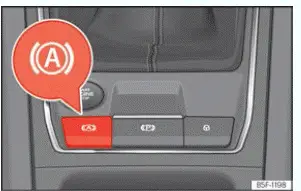
Fig. 153 In the lower part of the centre
console: Auto Hold function button.
The Auto Hold function on your Seat Leon holds the vehicle securely at a standstill when stopped in traffic and prevents it from rolling away, without requiring you to keep your foot pressed down continuously on the service brake pedal.
 When the Auto Hold function is switched on and in standby, the status lamp on the instrument cluster lights up grey.
 When the Auto Hold function is actively holding the vehicle, the control lamp on the instrument cluster lights up green.
 The indicator control lamp of the
 button ››› Fig. 153 remains illuminated whenever the Auto Hold function is connected and active.
Requirements
- The system has successfully detected the driver's presence behind the wheel based on various monitored safety signals, such as: fastened driver's seatbelt, closed driver's door, and a detected occupant on the driver's seat.
- The engine is running smoothly.
Connecting and disconnecting
Press the physical Auto Hold button on the console. The integrated indicator lamp on the button turns on when the Auto Hold function is switched on. The function is now primed and available to be activated automatically. The button lamp goes out when the Auto Hold function is switched off.
Switching on and off automatically
If the Auto Hold function was switched on via the Auto Hold button prior to turning off the vehicle ignition, the function will remain automatically engaged after the ignition is switched back on.
If the Auto Hold function was left turned off, it will remain inactive the next time the ignition is switched on.
The Auto Hold function is automatically turned off if any of the following operating conditions occur:
1. If any of the fundamental prerequisites for the function are no longer satisfied.
2. If the engine runs erratically, misfires, or experiences any operational anomaly.
3. If the engine stalls unexpectedly.
4. On models with an automatic gearbox: If any of the tyres lose proper contact with the road surface, such as when driving over extreme uneven terrain or if the axles are crossed.
Activation and deactivation
The Auto Hold function activates automatically to hold your Seat Leon when the following conditions are met (all criteria must be satisfied simultaneously):
1. The Auto Hold function is switched on.
2. The vehicle is brought to a complete standstill using the brake pedal on flat ground or on an incline.
3. The engine is rotating normally and correctly.
The Auto Hold function deactivates automatically and releases the brakes when the following conditions are met:
1. The car moves off again:
On automatic gearbox models: by pressing the accelerator pedal.
On manual gearbox models: by lifting your foot off the clutch pedal while simultaneously pressing the accelerator pedal (provided that a forward or reverse gear is engaged).
2. The function is manually switched off using the button actions described in previous sections.
WARNING The smart technology powering Auto Hold cannot override or defy the limits imposed by the unyielding laws of physics and operates strictly within established system boundaries. Never allow the driving convenience offered by the Auto Hold function to induce you to take unnecessary risks that compromise road safety.
- Never leave your Seat Leon running unattended with the Auto Hold function holding the vehicle.
- The Auto Hold function cannot always keep the vehicle securely stopped on a steep uphill grade, nor can it brake the car sufficiently on a slippery downhill slope—for example, on wet, icy, or snow-covered road surfaces.
NOTICE Always deactivate the Auto Hold function before driving your Seat Leon into an automated car wash facility.
Failure to turn off Auto Hold could cause mechanical damage due to the automatic application of the parking brake inside the wash machinery.
Note After reconnecting or replacing the 12-volt vehicle battery, drive your Seat Leon for a short distance at moderate speed to recalibrate and reset the Auto Hold function for correct operation.
 Park the vehicle
Parking
When parking your Seat Leon, all applicable legal requirements, regional traffic regulations, and local ordinances should always be strictly observed.
1. Engage the electronic parking brake ...
 General information on parking systems
Automatic brake operation
The automatic braking feature integrated into the parking systems of your Seat Leon is engineered to reduce the danger of a collision when an unexpected obstacle is detected ...
See also:
Installing and removing the mirror adjustment
switch E43 / E168
Special tools and workshop equipment required
Lever - U30800-
Note
The switch module may vary, depending on equipment. Installation
and removal of the switch module is identical and
o ...
