
Seat Leon >> Using the lane change assist
Lane Change Assist shares the underlying rear radar sensor system used by Side Assist. Consequently, read all technical details and instructions regarding Side Assist thoroughly, making sure to observe system boundaries and dashboard messages.
Activating the comfort turn signal while driving on a highway or dual carriageway—provided all operational prerequisites are satisfied and no surrounding vehicles are detected in the hazard zone—provides automated steering support while your vehicle executes a lane change.
Prerequisites
Lane Change Assist is available, depending on your Seat Leon's equipment package, when driving forward on multi-lane motorways that are mapped within the infotainment system's navigation database at speeds exceeding 65 km/h (40 mph).
Travel Assist must also be actively switched on and regulating.
The comfort turn signals feature must first be enabled within the vehicle settings menu inside the central infotainment system.
Status display
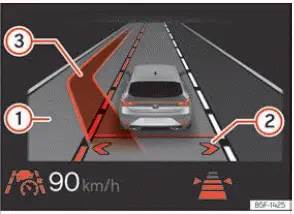
Fig. 147 On the instrument cluster display:
lane change assist display (schematic
representation).
- Adjoining lane highlighted: an assisted lane change is clear and possible on that respective side.
- Arrows displayed in the vehicle's own lane indicate that the assisted lane change sub-function is enabled:
- Grey arrow: changing lanes to that specific side of the vehicle is currently not possible.
- White arrow: changing lanes to that specific side of the vehicle is available and clear.
- Green trajectory line on the overtaking lane: an assisted lane change manoeuvre is actively in progress.
Activating and deactivating lane change assist
You can enable or disable Lane Change Assist via the main infotainment system screen.
1. Access the dedicated driver assistant menu.
2. Select Travel Assist.
3. Toggle the Lane Change Assist checkbox on or off as a sub-function of Travel Assist.
Note If an unexpected system fault occurs, Lane Change Assist may automatically switch off or interrupt an in-progress lane change manoeuvre.
Activating lane change assist while driving
Once all operating prerequisites have been satisfied and your programmed cruising speed has been stored using the set button  :
1. Press the set button  once more.
This action fully activates lane assistance. The directional lane arrows for your vehicle's lane will appear in grey on the instrument cluster display ››› Fig. 147 2.
Changing lanes
When the rear radar sensors detect no approaching vehicles or obstacles in the detection field and an assisted lane change into an adjacent lane is clear, the corresponding adjoining lane is highlighted on the cluster display next to your car. The directional arrow for that side illuminates in white ››› Fig. 147 2.
1. When you tap the turn signal stalk to trigger the comfort turn signal toward the desired side, your Seat Leon initiates the lane change. A visual confirmation message is also shown on the display screen.
During the physical lane change, the vehicle automatically maintains the active turn signal on that side. Once the manoeuvre is safely completed and the vehicle is centred in the new lane, the turn signal automatically switches off.
WARNING The rear radar sensor system cannot detect every single object or fast-approaching vehicle in all environmental conditions and functions strictly within physical system limitations.
If you rely on Lane Change Assist irresponsibly or without checking your blind spots, severe accidents and personal injuries can occur.
This driver support system is never a substitute for continuous driver concentration and situational awareness.
- Before initiating any lane change, always check your exterior mirrors and shoulder blind spots to verify it is completely safe. Rapidly approaching vehicles from behind may not be detected by radar sensors in time.
- Keep your hands on the steering wheel rim at all times and remain ready to take back immediate manual control over vehicle speed and direction.
Turning off the lane change assist
- The function turns off automatically if the driver turns the steering wheel sharply or applies manual counter-steering torque.
- OR: by pressing the steering wheel control button
 .
- OR: by depressing the service brake pedal.
Following any of these driver inputs, Lane Change Assist is instantly deactivated.
 Operating Travel Assist
Fig. 146 Left side of the multifunction steering
wheel
Switch on and start regulation
The Travel Assist function is activated directly via the driver assistance selection menu shown on the instru ...
 Troubleshooting
Travel Assist is not available or does
not work as expected
The control lamp illuminates in yellow on the dash, accompanied by an explanatory diagnostic warning message displayed directly on the di ...
See also:
Description of front airbags
The airbag system is not a substitute for the seat belts.
Fig. 17 Driver airbag
located in steering wheel
Fig. 18 Front passenger
airbag located in dash
panel
The front airbag for the driver ...
