
Seat Leon >> ACC operation
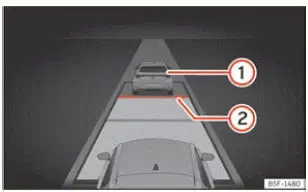
Fig. 136 On the instrument cluster display: ACC
active.
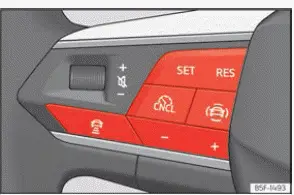
Fig. 137 On the multifunction steering wheel:
buttons for operating the ACC
- Vehicle detected ahead. This indicator lights up if a preceding vehicle is detected within range and a following distance is set.
- Selected following distance level indicator.
Connecting
- Press the dedicated control button located on the multifunction steering wheel ››› Fig. 137.
- Next, select the "ACC (Adaptive Cruise Control)" checkbox within the driving assistants menu on your display screen.
At this point, the ACC is in standby mode and regulation has not yet started.
Start regulation
Activating the Adaptive Cruise Control system on your Seat Leon will also automatically activate the Traction Control System (TCS) for enhanced safety.
- To initiate speed and distance regulation, press the button ››› Fig. 137. To start regulation, press the
 button ››› Fig. 137.
The ACC saves your current vehicle speed and maintains the pre-selected following distance. If your current speed happens to be outside the predefined speed operating range, ACC automatically adjusts the speed to the nearest boundary limit of that range.
Depending on the prevailing driving situation, one of the following control lamps will illuminate on the dashboard:
 Lights up green
ACC is connected and active, but no vehicle is currently detected directly in front.
 Lights up green
ACC is connected and active, and a vehicle has been detected directly in front.
When the ACC system is placed in standby, the respective control lamps light up in grey.
Program the speed
 + 1 km/h (1 mph)
 - 1 km/h (1 mph)
 + 10 km/h (5 mph)
 - 10 km/h (5 mph)
Program the distance setting
The following distance can be adjusted across one of five distinct levels, ranging from very short to very long:
- Press the
 button and then use the + or - button ››› Fig. 137.
- Alternatively, press the
 button as many times as necessary to cycle through and set your desired distance level.
Always keep each country's specific legal regulations regarding minimum following and braking distances in mind.
Suspend regulation (standby)
- Briefly press the
 button ››› Fig. 137 or gently depress the service brake pedal.
The ACC indicator lamp turns grey; your previously configured speed and distance settings remain safely stored in memory.
If the Traction Control System (TCS) or Electronic Stability Control (ESC) is switched off manually, ACC regulation is automatically interrupted.
Reinstating the cruise control
- Press the
 button. The ACC will regulate your speed back to the last saved speed and distance setting.
- OR: Press the
 button to regulate speed based on your current vehicle speed.
Exceeding the speed regulated by the ACC
While driving with the ACC switched on, you can temporarily increase your speed by depressing the accelerator pedal—for instance, when overtaking. ACC regulation is suspended during acceleration and will automatically resume once you release the throttle pedal.
Changing the drive profile
In vehicles equipped with the SEAT Drive Profile function, the active drive profile you select can noticeably influence the acceleration and braking dynamics of the ACC system.
In models without the physical SEAT Drive Profile selector, the behavior of the ACC can still be tailored by selecting preferred profile modes within the infotainment system under Drive assist. The resulting ACC response characteristics will mirror those of the corresponding SEAT Drive Profile.
WARNING Before driving off in your Seat Leon, always check that the road ahead is completely clear. The front radar sensor may occasionally fail to detect stationary obstacles lying on the road surface. This can lead to collisions and serious personal injury. Be prepared to apply the service brakes manually if necessary.
NOTICE If you override the system by increasing speed using the accelerator pedal, the ACC may not be able to instantly adjust speed or maintain safe distance due to the inherent physical limitations of radar detection.
- Always remain vigilant and be fully prepared to react immediately if required by traffic dynamics.
 Introduction
Adaptive Cruise Control (ACC) on your Seat Leon helps you maintain a constant, preselected driving speed effortlessly. When your vehicle approaches slower traffic or another vehicle travelling ahead, ...
 Special driving situations
Fig. 138 On the instrument cluster display: ACC
active, vehicle detected on the left.
Always remain fully aware of the operational limitations and safety warnings described at the beginning of thi ...
See also:
Instrument cluster operation
Introduction
With the vehicle ignition switched on, you can easily access and read the various operational functions of the display by scrolling smoothly through the onboard menus.
In vehicles equip ...
