
Seat Leon >> General notes
Safety advice
WARNING
- The ultimate responsibility for safe driving rests with the driver at all times. Advanced driver assist systems are never a replacement for driver attentiveness and focus.
Direct all your attention toward the road ahead and remain fully prepared to intervene and override the systems at any moment.
- Utilize drive assist systems only when prevailing conditions safely allow. Your driving style must always be tailored to match current weather, visibility, road surface, and traffic conditions.
- For drive assist systems to react correctly and reliably, all external sensors and cameras must operate without physical limitations. Please read and observe all specific notes regarding sensors and cameras in this chapter.
Note
- Always observe the specific traffic rules and regulations of each country, particularly regarding driving etiquette, forming an emergency corridor, maintaining safe following distances, speed limits, parking positions, and wheel alignment. The driver is solely and legally responsible for always complying with local regulations.
- The exterior body surface directly in front of and surrounding the radar sensor must never be covered with stickers, adhesives, auxiliary headlights, or similar items, as this can severely impair the operation of the assistants. Furthermore, if the vehicle is improperly repaired or structural modifications are made to the front end, the functionality of the assistant systems may be negatively affected.
- The precise calibration, repair, and adjustment of onboard sensors and cameras require specialized technical knowledge and dedicated diagnostic tools. It is strongly recommended to visit an authorized SEAT dealership for this service.
System limits
WARNING
- Advanced drive assist systems integrated into your Seat Leon can never overcome the fundamental, unyielding laws of physics. Depending on prevailing traffic and road circumstances, an unexpected collision may still be unavoidable.
- Critical warnings, informational notices, and instrument cluster control lamps may occasionally not be displayed on time, or could be displayed incorrectly—for instance, if another vehicle approaches or cuts in much too quickly.
- Automatic corrective interventions by drive assist systems (such as active inputs into the steering or sudden braking applications) may be insufficient or may fail to occur entirely, depending on the specific dynamics of the situation. As the driver, you must always remain fully alert and be prepared to take immediate control at all times.
Note
- Due to physical detection limits in the surrounding environment, driver assistance systems may fail to issue warnings or intervene in time, or conversely, they might activate even when it is completely undesired. Furthermore, auxiliary systems can occasionally misinterpret a driving manoeuvre and consequently warn the driver in an unexpected or false manner.
- When trailer towing mode is active and selected, certain onboard assist systems may react with functional limitations, behave in an unusual way, or become entirely unavailable.
Always keep the specific instructions and safety guidelines relating to trailer towing mode in mind when hauling a load.
Button for the assistant systems
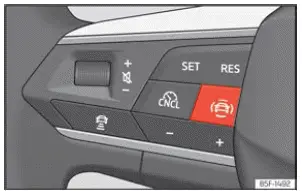
Fig. 126 Left side of the multifunction steering
wheel: button for driver assistance systems
(depending on the version).
The dedicated button for controlling the driver assistance systems on your Seat Leon is conveniently positioned directly on the left spoke of the multifunction steering wheel.
This physical control button can be used to quickly access and toggle individual driver assistance systems on or off within the central Assistants menu.
- Press the
 button to open the main Assistants menu on your screen.
- Select the specific assistance system in question from the list and turn it off or on as desired. A clear checkmark indicator confirms that the respective assistant system is currently switched on.
- Next, confirm your selection by pressing the scroll wheel or confirmation button on the multifunction steering wheel.
Alternatively, these assistant systems can also be managed, switched on, and turned off through the central infotainment system by navigating into the vehicle settings menu.

 Drive assist sensors and cameras
Front radar
Fig. 127 On the front bumper: front and side
radar sensors.
Fig. 128 Detection area.
Your Seat Leon may be fitted with high-precision radar sensors embedded discreetly into the fro ...
See also:
Removing and installing clutch position
sender - G476-
Removing
Push driver's seat as far back as possible.
If fitted, remove footwell cover on driver side .
Unplug electrical connector -arrow- at clutch position sender -
G476- .
Unclip ...
