
Seat Leon >> Interior lights
Lighting of the instrument cluster, displays and controls
The ambient brightness of the instrument panel, digital gauges, and interior switch gear can be adjusted through the vehicle settings menu on the central infotainment touchscreen.
The selected backlighting intensity automatically adjusts on the fly based on ambient light sensor readings inside the cabin.
When automatic dipped beam mode  is selected, an integrated light sensor automatically turns the dipped headlights, digital instrument cluster, and switch backlighting on or off depending on ambient brightness.
In certain driving conditions—such as entering an unlit tunnel without having the automatic dipped beam function  switched on—the backlighting of the instrument cluster may intentionally turn off. This dimming feature serves as a visual prompt reminding the driver to turn on the headlights manually. If your Seat Leon features a digital instrument cluster, a prominent pop-up message "Turn on the lights" will appear across the display screen.
Interior and reading lights
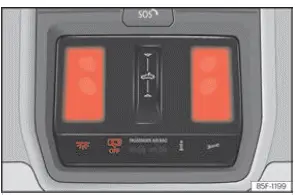
Fig. 106 Detail of headliner: front interior
lighting.
 Turning the cabin interior lights on
or off manually.
 Door contact control setting. The cabin
lights turn on automatically whenever you unlock your Seat Leon, open a door, or remove the key from the ignition. The interior illumination fades out a few seconds after all doors are closed, upon locking the car, or when switching on the ignition.
Reading light
The front reading lamps feature touch-sensitive controls: each lamp lens is switched on or off independently by touching its central surface area. Light intensity can also be adjusted smoothly based on touch pressure.
To turn on both front reading light lenses simultaneously, touch the main master symbol  ››› Fig. 106.
Glove compartment and luggage compartment lighting
Opening the front passenger glove compartment or opening the rear tailgate automatically activates their respective interior compartment lights, which turn off when closed.
Footwell lighting
The footwell lamps located beneath the lower dashboard (on both driver and front passenger sides) turn on when doors are opened and dim to a pleasant ambient level while driving. You can adjust footwell lighting brightness through the infotainment display by navigating to  > Lighting > Settings.
Note The overhead reading lights turn off automatically when the vehicle is locked or after a short delay following ignition shutoff, protecting the 12-volt battery from accidental drain.
Background lighting
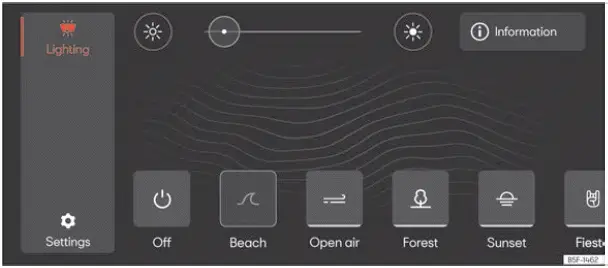
Fig. 107 Schematic representation: Background
lighting.
The customizable background ambient lighting system creates an inviting, sophisticated atmosphere across various zones within the interior of your Seat Leon.
You can choose between several predefined ambient light profiles or configure your own settings ››› Fig. 107.
The overall lighting intensity and color schemes can be adjusted seamlessly using the dedicated infotainment function button  :
Lighting profile Illuminates the cabin interior of your Seat Leon dynamically depending on the pre-selected atmospheric driving profile.
Individual Allows you to independently adjust the brightness intensity of the background lighting in each specific interior zone, as well as change the LED color hue on equipped models featuring integrated lighting strips across the front door panels and dashboard trim line.
Off Switches off the background ambient lighting system entirely.
Additional functions of the background lighting
- Door open alert: Dynamic visual feedback pulses along the LED light strip of the respective front door if the vehicle starts moving past 10 km/h while either front door is not latched securely.
- Rear windows locked alert: A visual warning animation activates on the front door light strip when a passenger tries to operate the rear power windows while they have been disabled via the driver's child safety lock button
 and Auto Lock is engaged.
- Representation of the hazard warning lights: A flashing red or amber animation sweeps across the entire cabin background lighting strip whenever the emergency hazard warning lights are active.
The visual representation of these interactive safety and status functions by the background lighting can be enabled or disabled both individually or collectively through the central infotainment system menu:  >
Lighting > Settings.
Note On certain software versions or trim lines, the exact color shade displayed on the Infotainment touchscreen preview may occasionally differ slightly from the actual ambient LED hue emitted inside the vehicle's interior.
 Driving abroad
The asymmetric light pattern of the dipped beam headlights is designed to illuminate the side of the road on which you are driving far more intensely.
When a car manufactured for countries with rig ...
 Visibility
...
See also:
Removing and installing sliding sunroof
adjustment control unit - J245-
Removing
Remove lighting elements and front control unit .
Loosen bolts -2-.
Remove the frame -1- in -the direction of arrow- out of the
moulded headliner.
Loosen bolts -2-.
...
