
Seat Leon >> Lighting and visibility buttons
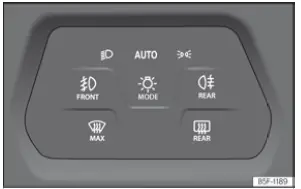
Fig. 104 Dash panel: light panel.
By repeatedly pressing the  button, you can cycle through and select between the following illumination modes (the corresponding indicator status light illuminates):
 Switching on the dipped beam headlights.
 Automatic control of dipped beam and daytime running lights.
 Switching on the side lights. The automatic headlight control
 activates automatically at speeds over approx. 10 km/h (6 mph).
Additionally, various auxiliary lighting and defrosting functions can be activated instantly by pressing directly on the corresponding touch symbol.
When a function is successfully activated, the corresponding symbol lights up to confirm operation. To deactivate the function, you simply need to press on the symbol again.
 Turning the front fog lights on
or off. In addition,
a pop-up status window displaying the selected
position is shown clearly in the digital instrument
cluster.
 Turning the rear fog lights on or
off. In addition,
the yellow control warning lamp on the instrument
cluster lights up
 .
 Switching the front windscreen demisting
and defrosting function on and off.
 Switching the rear window electrical heating
on and off.
It is always the sole responsibility of the driver to ensure that your Seat Leon is driven with the correct headlamp settings and appropriate lighting for prevailing road conditions.
Side lights
When the parking side lights  are switched
on, the side
marker lights integrated in both headlamp clusters, designated sections of the rear light assemblies, the number plate illumination lights, and the dashboard switch backlighting turn on. The automatic dipped beam will activate as soon as the vehicle exceeds a speed of approx. 10 km/h (6 mph).
Automatic dipped beam headlight control

When the automatic dipped beam mode is switched on, the exterior vehicle lighting and the illumination of the interior instruments and controls turn on and off automatically under the following specific environmental conditions:
- The exterior light sensor has detected surrounding darkness or low ambient light.
- The windscreen wipers have been operating continuously for a set duration.
When the automatic lights turn on, the dedicated control indicator lamp on the dash lights up in green.
Please remember that the automatic dipped beam system is only an auxiliary convenience function and cannot always identify every complex driving situation or weather condition with absolute precision.
Depending on your vehicle's specific equipment package, the vehicle settings menu of the central infotainment system can be used to adjust the sensor sensitivity moment at which the dipped beam automatically switches on.
Cornering light function
The static cornering light is an intelligent auxiliary function supplementing the main dipped beam to significantly improve side road visibility when turning or cornering at low speeds.
When the dipped beam headlights are switched on, the static cornering light illuminates automatically when driving at speeds below approximately 40 km/h (25 mph) or when negotiating very tight road bends.
- If the steering wheel is turned sharply or the directional turn signal is activated, the respective front fog light illuminates gradually. Once the turn is completed and the steering wheel straightens, the cornering light dims and turns off progressively.
- When engaging reverse gear, both front fog lights turn on simultaneously to illuminate side areas.
Daytime running lights
Integrated daytime running lights enhance your vehicle's visibility to oncoming traffic during daylight driving. They turn on automatically as soon as the ignition is switched on, provided sufficient ambient daylight is detected by the optical sensors.
Motorway light
The specialized motorway light feature is available on vehicles equipped with LED High headlamp assemblies.
- Activation: when cruising at speeds above 110 km/h (68 mph) for more than 10 seconds continuously, the dipped beam headlights raise slightly to extend the driver's forward visibility range on fast roads.
- Deactivation: as soon as the vehicle's speed drops below 100 km/h (62 mph), the dipped beam instantly lowers back down to its standard beam angle position.
Warning buzzers to warn that the lights have not been switched off
If the engine ignition is switched off and you open the driver's door while exterior lights remain active, an audible acoustic warning chime sounds to remind you to turn off the light switches before leaving your Seat Leon.
- When the parking lights are left switched on.
- When the side light lamp icon
 or dipped beam symbol
 remains active.
When the exterior exit lighting sequence ("Coming Home" function) is enabled, no acoustic audio chime will sound upon exiting the vehicle, as the system manages lighting shutoff automatically after a preset delay.
WARNING Severe road collisions can occur if the roadway is inadequately illuminated or if other motorists struggle to spot your vehicle in low-visibility conditions.
- The automatic dipped beam control system (
 )
responds primarily to changes in ambient brightness, meaning it will not automatically switch on dipped beams during dense fog or haze unless darkness is detected.
WARNING Standard side lights and daytime running lights do not provide sufficient illumination to safely illuminate the road ahead or guarantee that your Seat Leon is clearly visible to other drivers.
- Always activate dipped beam headlights manually at dusk, after dark, in rainy weather, or whenever atmospheric visibility drops.
- Daytime running lights must never be relied upon as main headlights when driving through poorly lit areas, tunnels, or severe weather conditions.
WARNING Headlights that are adjusted too high or used inappropriately can dazzle and distract oncoming drivers, creating severe hazards on the road.
- Always ensure that the headlamp range alignment on your Seat Leon is properly adjusted for current vehicle load conditions.
Note
- Local traffic laws and regional legal requirements regarding automotive light usage must always be observed when driving.
- The main dipped beam headlights operate exclusively when the ignition is switched on. When the ignition is turned off, the lighting system automatically defaults to side lights.
- High-intensity rear fog lights can easily dazzle trailing drivers. Use the rear fog lamp only when fog, snowfall, or heavy rain severely restricts visibility.
Note
When the light control panel is set to mode  or
 and front or rear fog lamps are activated, the dipped beam headlights will illuminate automatically regardless of surrounding ambient light levels.
 Vehicle lighting
...
 Turn signal and main beam lever
Fig. 105 Turn signal and main beam lever.
Move the steering column lever into the required position depending on your driving maneuver:
Right turn signal indicator or right-hand side parki ...
See also:
Removing and installing gear knob
Special tools and workshop equipment required
Hose clip pliers - V.A.G 1275 A-
Wedges - T10383-
Removing
Using removal wedge -T10383/1- , carefully pry gear lever
boot off centr ...
