
Seat Leon >> Set of vehicle keys
Vehicle key
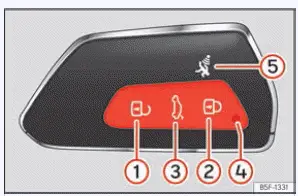
Fig. 68 Vehicle key
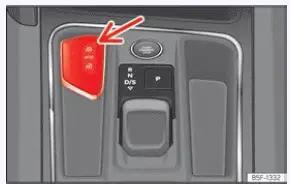
Fig. 69 Centre console (with automatic
transmission): vehicle key housing.
- Unlocks the vehicle doors and deactivates the central security system.
- Locks the vehicle securely and arms the alarm system.
- Unlocks only the rear lid of your Seat Leon.
Press and hold the button until all the turn signal indicator lights on the vehicle flash briefly to confirm execution.
You have a window of 2 minutes to open the rear lid after pressing this unlock command.
Once this time limit has passed, the tailgate will automatically lock again for safety. In addition, the integrated control lamp on the key flashes during operation.
- Control indicator lamp for signal feedback and battery status.
- Alarm panic button. Only press this button in the event of a genuine emergency! When the alarm button is triggered, the vehicle's horn sounds continuously and the turn signal lamps light up for a short duration. Press the button again to disconnect and silence the alarm.
Your Seat Leon can be conveniently locked and unlocked from a distance using the standard remote vehicle key fob.
The vehicle key unit includes an internal radio-frequency emitter and a replaceable battery cell.
The corresponding signal receiver is securely housed in the interior cabin of the vehicle.
The operational range of the vehicle key remote control with a fresh battery spans several metres around the perimeter of the vehicle.
If it becomes impossible to open or close the Seat Leon using the remote control key function, the key should be re-synchronised with the onboard system or have its internal battery changed promptly.
Multiple different keys belonging to the vehicle profile may be programmed and used interchangeably.
Control lamp on the vehicle key
When any button is pressed briefly on the vehicle key fob, the control lamp 4 ››› Fig. 68 flashes once briefly; however, if pressed for a prolonged period of time, it will flash multiple times in succession, such as when operating the convenience opening feature.
If the vehicle key control lamp fails to light up at all when a button is pressed, you need to replace the key's internal battery immediately.
Key housing
Depending on the specific trim version and equipment level, there is a dedicated housing slot for the key located close to the start engine button ››› Fig. 69.
Warning! Do not confuse this designated storage location with the separate backup slot designated for the emergency start procedure.
Spare key
To order and obtain a replacement spare key and other vehicle keys for your Seat Leon, the official vehicle chassis identification number (VIN) is strictly required.
Each new key contains a sophisticated internal microchip which must be precisely coded with digital data matching the vehicle's electronic immobiliser system. A vehicle key will not function to start the engine if it does not contain a coded microchip or if the microchip has not been correctly programmed. This rule applies equally to keys that are mechanically cut to match the door locks.
Additional vehicle keys or new spare keys can be obtained directly from an official SEAT Service network, a specialised workshop, or an approved key service provider qualified to create and code this specific kind of automotive key.
Any newly cut keys or replacement spare keys must be properly synchronised with the car before they can be used for driving.
WARNING
- Never leave children or persons with disabilities unattended inside the vehicle. In case of an emergency, they may not be able to exit the vehicle independently or manage the controls on their own.
- Uncontrolled or accidental use of the key by third parties, such as children, could activate electrical equipment (e.g. power windows), creating a severe accident hazard. Furthermore, the vehicle doors can be locked externally with the remote control key, making it extremely difficult to get outside help in an emergency situation.
- Never leave the keys inside an unattended vehicle. Unauthorised use or theft of your Seat Leon could result in personal injury, property damage, or total vehicle loss. Therefore, always take the key with you whenever you leave the vehicle.
NOTICE Do not leave the remote key directly near the wireless smartphone charger pad area, as this electromagnetic proximity may cause signal interference.
NOTICE All official vehicle keys contain sensitive electronic components. Protect them carefully from physical damage, heavy impacts, moisture, and humidity.
Note
- Only press the key buttons when you actually require the corresponding operational function. Pushing the buttons unnecessarily could accidentally unlock your Seat Leon or trigger the panic alarm. This can happen even when you are standing outside the normal radio radius of action under certain conditions.
- Key remote operation can be significantly influenced or blocked by overlapping external radio signals operating close to the vehicle within the same frequency range, such as nearby radio communication transmitters or powerful mobile telephones.
- Physical obstacles situated between the remote control transmitter and the vehicle, adverse weather conditions, and depleted key batteries can considerably reduce the effective operating range of the remote control.
- If the buttons of the vehicle key are
depressed or one of the interior central locking buttons
is pressed repeatedly in
rapid succession, the central locking system temporarily
disconnects itself as a built-in protection measure against electronic overloading.
The vehicle will then unlock automatically. Lock it manually or via the fob again if necessary.
- Spare remote control keys are available through your authorized Technical Service network, where they must be electronically matched to the vehicle's central locking security system.
Pulling out the key blade
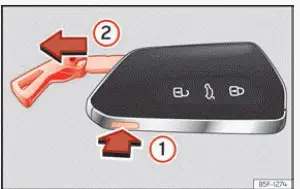
Fig. 70 Vehicle key: remove the key blade.
The central locking remote control key fob for your Seat Leon features a concealed mechanical key blade inside it, designed specifically for use in case of an emergency locking or unlocking situation involving the driver's door lock.
- Press the release button designated as ››› Fig. 70 1 to release the attachment ring from the key fob housing and release the integrated key blade 2. Pressing lightly on the ring leaves it fixed securely as a normal everyday key fob loop.
- Press the ››› Fig. 70 1 button to unlock the internal catch.
Press and hold button 1 down firmly and at the same time pull outward on the attachment ring in the direction of the indicated arrow ››› Fig. 70 2 to completely extract the emergency key blade from its housing slot.
Changing the battery
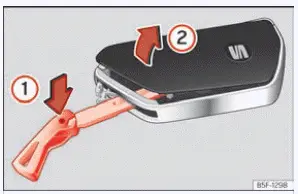
Fig. 71 Vehicle key: open the battery
compartment cover.
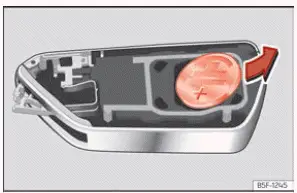
Fig. 72 Vehicle key: removing the battery.
SEAT recommends that you ask a specialised workshop or service center to replace the key fob battery if you prefer professional assistance.
The internal coin cell battery is located securely at the back of the vehicle key fob, positioned directly underneath a clipped protective cover.
Changing the battery
- First, remove the mechanical key blade completely from the vehicle key housing.
- Insert the tip of the key blade into the designated slot ››› Fig. 71, press it inward in the direction of arrow 1, and carefully detach the plastic cover by levering it upward 2.
- Carefully remove the depleted coin cell battery from its compartment using a suitable thin non-conductive object ››› Fig. 72.
- Insert the new replacement battery and press it firmly into the battery compartment housing.
- Place the protective cover back into position and press it onto the vehicle key housing until it clicks audibly into place.
DANGER Swallowing a coin battery with a diameter of 20 mm or any other type of button cell battery can cause severe internal chemical burns, serious injuries, or even death within a very short period of time.
- Always keep the vehicle key and all spare key fobs containing batteries completely out of reach of young children.
- If you suspect or know that someone has accidentally swallowed a battery, seek immediate emergency medical attention without delay.
NOTICE
- If the battery replacement procedure is not performed correctly, the sensitive electronic vehicle key may suffer permanent damage.
- The use of unsuitable or off-specification replacement batteries may damage the internal circuitry of the vehicle key. For this reason, always replace the dead battery with another fresh cell of the exact same rated voltage, physical size, and technical specifications.
- When fitting the new battery into the housing, always check carefully that the electrical polarity is correct.
For the sake of the environment
Please ensure you dispose of your used, spent batteries correctly at designated collection points and with respect for environmental protection guidelines.
Synchronize the vehicle key
If the  button is pressed repeatedly or
frequently outside of the normal functional
radio range of your Seat Leon, it is possible that the vehicle can no longer be locked or unlocked using the remote transmitter key. In this scenario, the key must be resynchronised
manually as described in the procedure below:
- Stand right next to your vehicle.
- Briefly press the
 button on
the vehicle key fob twice in quick succession.
OR:
- Remove the concealed emergency key blade from the housing.
- Press the
 button on the remote key.
- Manually unlock the vehicle driver's door using the mechanical key blade.
- Open the driver's door. If your Seat Leon is equipped with an active anti-theft alarm system, the alarm will sound and trigger immediately.
- Switch the ignition on. Please note: to turn on
the ignition successfully during this sequence, place the vehicle key flat at the bottom
of the central console armrest storage box, positioning it as close as possible
to the designated Kessy emergency start logo
 .
This successfully completes the key synchronization procedure.

 Keyless Access system
Locking and unlocking with the Keyless
Access system
Fig. 73 Keyless Access: proximity zones.
Fig. 74 Door handle: sensor surfaces.
Unlocking sensor touch surface located on the insi ...
See also:
Panoramic sliding roof normalisation run
Note
After renewal of glass panel, motor, tilting mechanism or sun
blind, a normalisation run must be carried out for the corresponding
drive.
Roll-back function is switched off when establi ...
