
Seat Leon >> Keyless Access system
Locking and unlocking with the Keyless Access system
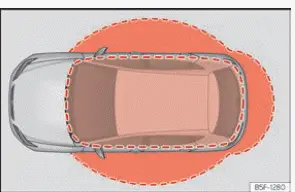
Fig. 73 Keyless Access: proximity zones.
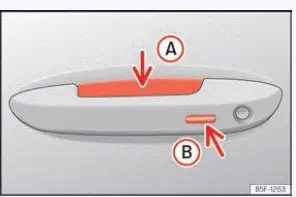
Fig. 74 Door handle: sensor surfaces.
- Unlocking sensor touch surface located on the inside of the driver or passenger door handle.
- Locking sensing touch surface located on the outside of the door handle housing.
Depending on the specific trim package and equipment level, your Seat Leon may be equipped with the advanced Keyless Access system. This is a convenient keyless locking and starting technology that allows you to unlock and lock the vehicle without ever needing to actively press buttons on the key fob. For this feature to work, it is only necessary that a valid, authenticated vehicle key is present within the external detection perimeter corresponding to the specific door handle you are approaching.
Configuring the Keyless Access system
The operational behaviour and sensitivity of the Keyless Access system can be customized easily within the Vehicle settings menu of the central Infotainment system.
If the Keyless Access function is toggled off in the menu, its automated operation becomes temporarily limited.
Unlocks the vehicle.
- Simply touch the sensor touch surface on the inside of the door handle A. All turn signal lights will flash twice to confirm unlocking.
If selective opening mode is fitted and active, touching the sensor's surface twice in succession unlocks all vehicle doors simultaneously.
If the vehicle remains untouched and is not unlocked for an extended period of time, the proximity function goes into sleep mode to save battery. The function will reactivate automatically the next time that your Seat Leon is unlocked using the remote key fob.
Locks the vehicle.
- Park your Seat Leon securely and switch off the ignition.
- Touch the exterior sensor surface B ››› Fig. 74 located on the outside of the door handle. All turn signals will flash once to confirm the vehicle is locked.
To give you a chance to check and confirm that the doors are properly secured, the unlocking sensor function is temporarily deactivated for a few seconds right after locking.
Vehicle locking when walking away
Your Seat Leon may lock automatically when you step out and walk away from it. The following conditions must be met simultaneously for this to trigger:
- The walk-away locking function is enabled in the infotainment system settings.
- All recognized vehicle keys have moved outside the exterior locking detection perimeter.
All turn signal lights flash once when this automatic locking sequence has been performed successfully.
Automatic walk-away locking will not occur if there is another valid vehicle key left inside the cabin.
One-time deactivation of automatic locking
1. Press and hold the  button for
more than 2
seconds while the door remains open.
Automatic walk-away locking will remain suspended until the next time the vehicle is intentionally locked using the handle or key.
The vehicle will only lock itself if all passenger doors and the rear lid are fully closed. If this notification option has been activated in your vehicle settings menu, an audible warning tone may sound to indicate that a door is still ajar.
In vehicles fitted with the "Safe" security locking system, when the vehicle locks automatically while walking away from it, it locks without full engagement of the interior "Safe" function.
This difference in security status is indicated to the driver by a distinct audible signal.
The vehicle's full "Safe" security system is only activated when you lock the car intentionally via the exterior door handle sensor or physical contact key.
If a valid key is left lingering in the active detection zone around your Seat Leon for a prolonged period of time, the convenience options for locking when walking away and unlocking upon approach may operate in a restricted manner.
Note Certain nearby electronic devices or strong radio interference can occasionally prevent the vehicle from locking properly. Your Seat Leon will then remain unlocked without issuing a loud audible warning. Always make sure to visually verify that the vehicle is locked before leaving it unattended.
Note If the vehicle is parked stationary for a long time without being driven, it can eventually only be unlocked via the sensor surface inside the driver's door handle or directly with the remote vehicle key.
Unlocking the vehicle on approach
Your Seat Leon can be set to unlock automatically as you walk up and approach it.
For this proximity feature to work, the function must be active in the infotainment system menu and the valid vehicle key must enter the vehicle's immediate approach zone.
- The vehicle unlocks automatically as soon as the vehicle key is detected nearby ››› Fig. 73. All turn signal indicators flash twice to signal access.
If the vehicle is not entered or unlocked for an extended period of time, the "Unlock vehicle when approaching it" proximity function is temporarily deactivated to protect the vehicle battery. This function reactivates normally once the vehicle is locked again using the key fob or handle sensor.
When configuring the central locking menu to open only specific doors in the infotainment system, keep in mind that the "Unlock vehicle when approaching" feature may operate in a restricted manner.
Unlocking the rear lid
When the vehicle is locked and the "Keyless Access" system is active, the rear lid unlocks automatically when opened if a valid vehicle key is present within its rear proximity zone. The rear lid secures and locks again right after it is closed.
If all doors are set to unlock through the central locking and the unlock when approaching setting in "Keyless Access" is active, your Seat Leon remains unlocked after the rear lid is shut. The vehicle will not lock itself automatically in this scenario.
Temporarily deactivating the Keyless Access system
The keyless unlocking function of the "Keyless Access" system can be temporarily deactivated whenever needed:
- Move the gear selector lever to position P, as otherwise the vehicle cannot be locked properly.
- Lock the vehicle by pressing the
 button on the
vehicle key.
- Within 5 seconds, touch the exterior sensor on the
outside of the door handle once ››› Fig. 74 B.
Be careful not to grip the inner handle while doing so. This action temporarily deactivates the Keyless Access sensor functionality.
- Verify that the system is deactivated by pulling on the door handle after waiting at least 10 seconds. The door should remain firmly locked and unopened.
After performing this steps, the Seat Leon can only be unlocked electronically by pressing the unlock button on the vehicle key. Following the next key unlock cycle, the Keyless Access system becomes fully active again.
Permanently disabling the Keyless Access system
If preferred, the Keyless Access system can also be permanently deactivated altogether through the central infotainment system settings.
Note When Keyless Access is switched off in the infotainment menu, sensor-controlled hands-free rear lid opening and closing (Easy Open) is disabled automatically as well, even if the option still shows as "active" in the main vehicle settings.
Comfort functions
To roll up and close all power windows as well as the panoramic sunroof using the comfort system, hold a finger continuously for a few seconds against the exterior locking sensor surface ››› Fig. 74 B of the door handle until both the windows and roof have shut completely.
The exact door unlocking behavior when touching the sensor
surface on the door handle of your Seat Leon depends directly on your current
infotainment settings, accessible via  >
Vehicle > Exterior > Opening/Closing.
Troubleshooting
The Keyless Access system does not work
The normal operation and sensitivity of the exterior door sensor surfaces can be limited or blocked completely if they become heavily soiled, covered in mud, or caked with road grime.
- Clean the exterior door sensor surfaces thoroughly using a soft, damp cloth.
All turn signals flash four times
This warning signal indicates that the vehicle key that was last used is still located inside the passenger compartment of your Seat Leon.
- Retrieve the key from inside the cabin and lock the vehicle again.
Automatic deactivation of the sensor surfaces
The exterior sensor touch surfaces on your Seat Leon are automatically deactivated to conserve vehicle battery power in the following specific cases:
- If the vehicle is left parked and is not unlocked or locked for an extended period of time.
- If any of the door sensor surfaces are activated unusually often in rapid succession.
To reactivate the sensor surfaces back to normal operating order:
- Unlock the vehicle manually using the designated button on your vehicle remote key fob.
NOTICE The touch-sensitive sensor surfaces on the exterior door handles may activate accidentally if struck by a high-pressure jet of water or high-temperature steam during washing, provided that a valid vehicle key is within the external proximity detection zone. If at least one of the power windows happens to be open and the sensor on a handle activates continuously, all vehicle windows will roll up and close automatically.
Note If the warning message "Keyless system out of order" is displayed on your Seat Leon instrument cluster screen, abnormalities and operational failures may occur in the Keyless Access system. Contact a specialised workshop promptly for professional diagnostics.
Note If there is no recognized vehicle key inside the cabin or if the onboard system fails to detect one, an appropriate warning will display on the driver's instrument cluster screen.
This situation can happen if another strong radio frequency signal source (such as a nearby mobile phone or an active wireless smartphone charger) interferes with the key's transmission frequency, or if the key fob is heavily shielded by another metallic object, such as a metal key case or wallet.
 Set of vehicle keys
Vehicle key
Fig. 68 Vehicle key
Fig. 69 Centre console (with automatic
transmission): vehicle key housing.
Unlocks the vehicle doors and deactivates the central security system.
Loc ...
 Central locking
...
See also:
Assembly overview - headlight washer
system
Assembly overview - headlight wiper system, vehicles without additional
left
cooler
- Flexible hose
- Headlamp washer pump -
V11-
Removal and installation
- Windscreen and head ...
