
Seat Leon >> Charging settings
Introduction
Immediate charging
The high-voltage battery in your Seat Leon can be charged without any further configuration and directly according to the currently available charging option.
1. Plug in the charging cable. A dedicated charging information screen will open automatically in the infotainment system. The charging process starts instantly without manual intervention.
2. Set the maximum battery charge level required for your desired daily driving range within the Infotainment system settings.
Advanced charging configuration
Individual AC charging settings tailored for your specific daily location, such as at your home, office or a frequent public charging station, are available if a specific charging location (referred to as a Schedule) has been created in the Infotainment system.
1. Select:  > Charging.
2. Store your current charging location in the Schedule menu to automate future sessions.
If you want to perform scheduled, programmed charging, establish and activate a specific departure time in advance.
3. Make further power adjustments if desired to match your electricity tariff.
Note If no scheduled start time has been activated, the high-voltage battery of your Seat Leon charges straight to the maximum allowed charge level.
Changing the charging mode
The available charging modes can be selected easily via a convenient drop-down list in the main Charging menu or directly inside the departure settings menu.
The available charging modes depend on the active Schedule configuration and the technical electrical requirements at your current location.
Overview
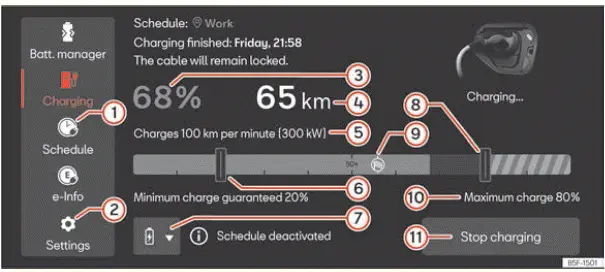
Fig. 64 In the infotainment system: Charging main
menu.
Some of the following indications and telemetry readouts are only available when an active charging schedule has been configured in your Seat Leon.
- Charge scheduling and timer management.
- General charging settings and hardware parameters.
- Current state of charge percentage of the high-voltage battery pack.
- Current electric driving range estimation.
- Charging speed and power telemetry: the dynamic increase in
range per hour or per minute when charging
at the current power input is clearly displayed.
The actual charging power depends heavily on the external charging infrastructure and the current thermal temperature of the high-voltage battery. Consequently, the charging power can fluctuate dynamically during the ongoing session.
- Minimum charging level threshold. Only visible with an active scheduled charging mode, based on a pre-configured routine (not visible in immediate charging mode). Allows the minimum target charge level to be adjusted. If an active navigation destination is set, the system intelligently suggests the minimum required charging level to reach that specific destination safely.
- Charging mode selector based on the active
schedule for the vehicle's current geographic position.
Displayed only if a schedule has been previously set up by the user. Provides extra contextual information about the active charging schedule.
- Interactive touch pad slider for adjusting the maximum allowed charging level of the battery.
- Navigation symbol with planned multi-stop charging routines: the maximum charging level is automatically optimized and adjusted for the next suggested route stop.
- Maximum set battery charging level indicator.
- Control button to end the current charge session or restart it. Visible exclusively during an active high-voltage charging process.
Instructions for plugging in the charging connector
Detailed telemetry and information regarding the current charging process of your Seat Leon are conveniently displayed in the central infotainment system.
Close the information screen:
- Press the
 function button on the interface.
- EITHER: the display screen ends and closes automatically after 2 minutes of inactivity.
- OR: securely lock the vehicle from outside.
Configuration in the Settings menu
Open the General charging settings menu
1. Open the main Charging menu on your display.
2. Push the  2 ››› Fig. 64 button.
Settings in unknown locations
- Reduce the AC charging power: the electrical charging current is reduced to 6 or 8 amps depending on regional country regulations. With this setting enabled, you can effectively reduce mains grid overload when charging from a standard household socket.
- Release the AC power cable: After the high-voltage charging process is completely finished, the physical connector releases automatically for user convenience.
Battery Care Mode function
The intelligent function automatically limits the maximum charge level to 80% for subsequent charging cycles to preserve cell longevity. If it is necessary on a specific occasion to charge over 80% and this override is configured, the subsequent charge will automatically revert to being limited to 80%.
Note
- The programmed schedule charge configuration prevails over the "Battery Care" configuration setting (meaning the maximum charge level target is not automatically reset permanently).
- SEAT strongly recommends utilizing the Battery Care Mode function during daily routine use to prolong the operational life span of the high-voltage battery in your Seat Leon.
Set the battery charging limits
The digital infotainment system can be utilized easily to adjust the maximum and minimum charge thresholds and thus tailor the vehicle's electrical range to suit your daily driving needs.
Maximum battery charging level
Normally, if you use your Seat Leon regularly for standard commutes, it is not necessary to fully charge the high-voltage battery to 100%. Setting a maximum charging level restricts the battery's maximum state of charge to prevent undue chemical stress.
- Move the touch slider to your desired percentage value within the infotainment system's dedicated charging settings menu.
The maximum charging level threshold can also be adapted dynamically during an ongoing charging session if circumstances change.
Minimum charging level of the battery
The minimum charging level parameter sets the baseline state of charge for a saved schedule. This useful function can be used to guarantee a minimum reserve range at all times.
- In the infotainment system select:
 >
Charging.
- Set the preferred minimum charging level within the active schedule profile.
After connecting the electrical supply, the vehicle will first charge up to the battery's specified minimum charging level. Preferred time windows or a specific departure time set for programmed charging will only be factored in and executed once this foundational limit is successfully reached.
Examples for charging with alternating current (AC)
For standard AC charging operations with your Seat Leon, SEAT recommends applying the following optimized settings:
Everyday use - Long range is not necessary
- Maximum battery charging level: 80% maximum limit.
- Minimum battery charging level: 20% as a minimum threshold if the outside ambient temperature is mild or warm, or 40% if the weather is cool or cold.
Long distance travel - Long range required
- Maximum battery charging level: 100% full capacity.
- Minimum battery charging level: 20% as a minimum threshold if the outside ambient temperature is mild or warm, or 40% if the weather is cool or cold.
- Avoid leaving the vehicle parked stagnant and start driving your Seat Leon promptly after completing the battery charge.
Set charging locations (Schedule)
You can easily create custom schedules associated with specific charging locations directly through the infotainment system of your Seat Leon.
The vehicle automatically recognises a saved charging location whenever it arrives there and applies all pre-configured parameters for that specific spot during power delivery.
Location data
The infotainment system relies on real-time location data (precise geographical coordinates) collected by the vehicle whenever you establish or trigger a saved schedule profile.
Create a schedule
- In the infotainment system select:
 >
Charging.
- Press Schedule.
- Add your current charging location and assign a custom name to it (you can store a maximum of 5 distinct locations).
Delete a schedule
- In the infotainment system select:
 >
Charging.
- Press Schedule.
- Press the
 function button.
- Press the function button
 to remove the selected
saved schedule from memory.
Settings
- For immediate charging within the current schedule, activate the corresponding option directly in the departure menu or via the charging modes selector in the main Charging menu.
- Set specific Departure time parameters.
- Reduce charging power in alternating current: the drawn charging current is stepped down to 6 or 8 amps depending on local electrical standards. This configuration helps avoid household mains overload when using a standard socket.
- Release the AC power cable: As soon as the charging process reaches completion, the locking mechanism disengages the connector automatically for effortless removal.
- Minimum battery charging level adjustable from 0-50%.
- Maximum battery charging level adjustable from 50-100%.
- Preferred times window: Activating this routine is particularly useful when running other heavy electrical appliances on the household circuit or when taking advantage of lower off-peak electricity tariffs.
- Display street address or exact geographical coordinates for verification.
Note All charging preferences saved within a profile apply exclusively to the currently identified charging location of your Seat Leon.
Departure time settings
Once a target charging location has been configured, the high-voltage battery can be managed to complete its charge cycle right at a chosen moment.
Set the departure time
- In the infotainment system select:
 >
Charging.
- Press Schedule.
- Open the saved profile for your specific charging location.
- Set your planned departure time (you can define up to three distinct timers per
location).
- Select active Days of the week.
- Specify the exact Time by which the high-voltage battery needs to complete charging.
- Set the timer to run as a single event or repeat weekly.
Air conditioning
To ensure comfortable cabin temperatures before driving, the interior of your Seat Leon is cooled or heated in advance of your set departure time using the integrated stationary climate control.
Available functionality depends on vehicle equipment and options fitted.
- Set your target temperature within the Stationary air conditioning menu screen.
Activate a departure time
- Press Schedule.
- Open the profile for your desired charging location.
- Activate the target departure time by ticking the corresponding
checkbox
 .
- Select your preferred programmed charging mode on the main charging selector.
Displays
 The active departure time is set to recur on a weekly basis.
Note The departure menu retains your selected charging mode automatically while giving you the option to adjust parameters whenever needed.
 Emergency release of the charging
connector
Valid for: hybrid vehicles
Fig. 63 Between the left wing panel and
the engine bonnet hinge: Charging connector
manual release mechanism puller.
Unlocking the charging connector
Prerequisites:
...
 Charging cable
Introduction
Valid for: hybrid vehicles
The specific type of charging cable supplied alongside your
vehicle basically depends on the technical
specifications and local electrical standards of each ...
See also:
Steering wheel audio version controls
Fig. 48 Controls on the
steering wheel
Fig. 49 Controls on the
steering wheel
a) Only for mp3 compatible radio.* ...
