
Seat Leon >> Charging with alternating current (AC)
Valid for: hybrid vehicles
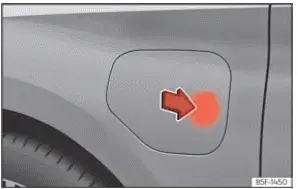
Fig. 57 Opening the charging socket cover.
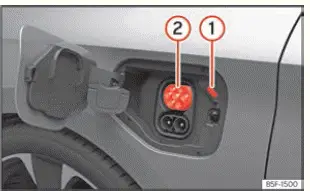
Fig. 58 Behind the battery charging cover on the
front left-hand side: Charging socket
- Charging process status display LED
- High-voltage charging socket
The onboard battery charger installed inside your Seat Leon converts incoming alternating current from the public grid into direct current suitable for storing in the traction battery.
AC charging station or socket cable connection: The vehicle's high-voltage battery can be replenished using alternating current (AC) by plugging into dedicated charging socket 2.
Connecting the charging cable
- First, plug the charging cable securely into the power outlet or dedicated public/home charging station.
Next, ensure the cable is fully unwound and free of tight coils to prevent overheating.
- When using the portable charging cable for domestic power sockets: The integrated cable protection device automatically performs a self-diagnostic test.
- Ensure the vehicle is unlocked, then gently press the designated area on the outer edge of the fuel/charging flap to spring open the battery charging cover ››› Fig. 57.
- Insert the charging connector firmly into the vehicle charging socket. Verify that the plug is pushed in completely until fully seated.
The connector locks into position automatically to prevent accidental disconnection.
The charging process indicator LED positioned beside the vehicle charging socket 1 will begin pulsing or flashing white ››› Fig. 58.
You can customize charging schedules and preference parameters as required directly through the central Infotainment system menu.
Automatic start of the charging process
If scheduled timer charging is not currently active, the battery charging sequence starts immediately upon connection.
Most public charging stations require user authorization or RFID card authentication before delivering power. It is essential to complete station authentication correctly; failing to do so may result in a communication or charging malfunction.
During charging
While energy is actively flowing, the charging process indicator on socket 1 flashes green, and the charging connector remains mechanically locked in place.
If the charging status indicator illuminates solid red, a system fault or connection error has been detected.
Interrupting the charging process
An active charging session can be paused or interrupted at any time using several methods:
- Unlock the vehicle doors using the key fob.
- Press the "Stop charging" soft-touch function button on the central Infotainment display. The status indicator light next to charging socket 1 will turn solid white. If you wish for the connector lock to disengage automatically, ensure the "Release connector automatically" option is selected in your charging preferences menu.
- Press the "Continue" function button on the screen to resume the session. The charging plug will lock again. Depending on the provider, you may need to re-authenticate yourself at public charging stations.
To restart a stopped charging process, simply press the corresponding on-screen function button.
After charging
Once the high-voltage battery has reached 100% state of charge, the charging process indicator on the vehicle socket lights up solid green.
- Unlock your Seat Leon using the vehicle key.
- Unplug the charging connector from the vehicle socket within 30 seconds of unlocking.
- OR: if "Release connector automatically" is enabled in your infotainment charging settings, the connector unlocks automatically the moment the charging session finishes.
- Disconnect the supply end of the charging cable from the wall power outlet and reinstall the protective weather cap.
- Close the outer charging flap securely, making sure you hear an audible click as it latches into place.
 Identification of compatible charging
infrastructure
Valid for: hybrid vehicles
Fig. 55 Identification of alternating current
(AC) and type 2 connector.
Fig. 56 Identification of direct current (DC)
and the vehicle's CCS connector
Compatibility ...
 Charging with direct current (DC)
Valid for: hybrid vehicles
Fig. 59 Opening the charging socket cover.
Fig. 60 Behind the battery charging cover on the
rear right-hand side.
Charging process status display LED
Dire ...
See also:
Steering wheel Audio + Telephone version controls
Fig. 50 Controls on the
steering wheel
Fig. 51 Controls on the
steering wheel
a) Only for mp3 compatible radio.* ...
