
Seat Leon >> Telephone interface
Introduction
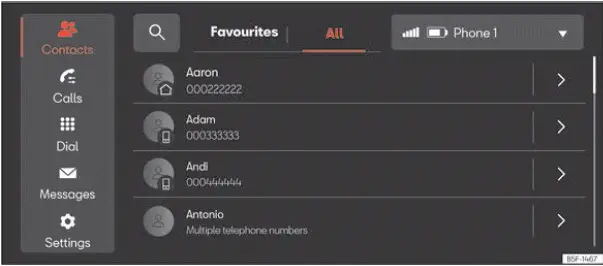
Fig. 176 Schematic representation: Phone view.
You can use the built-in telephone interface to connect your mobile phone to the infotainment system and operate hands-free phone functions directly through it. All call audio and media sound are played clearly through the vehicle's speakers.
Your Seat Leon allows you to connect up to two mobile phone devices simultaneously to the infotainment system.
High driving speeds, adverse weather conditions, rough road surfaces, a noisy cabin environment, surrounding street noise, and the strength of cellular reception can all affect the overall audio quality of a telephone conversation inside the vehicle.
Note
- As a general rule, pairing an external mobile device with your car is only necessary once. You can re-establish the device connection via Bluetooth or Wi-Fi with the infotainment system whenever you want without having to repeat the pairing process.
- The availability of specific telephony functions will depend on the software features of the mobile phone connected to the infotainment system, such as its operating system, mobile network carrier parameters, or service provider plan.
Connectivity Box
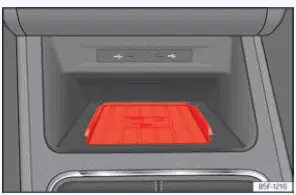
Fig. 177 On the centre console: pad for the
mobile phone connection.
The integrated Connectivity Box features multiple advanced functions designed to simplify mobile device usage while traveling.
These primary functions include:
- A built-in Wireless Charger.
- An integrated Mobile Signal Amplifier.
Wireless charger
If your mobile device is equipped with standard inductive Qi charging technology, it can be replenished wirelessly inside your Seat Leon.
To charge your mobile phone wirelessly:
- Place your mobile device flat in the middle of the charging pad with the screen facing upward ››› Fig. 177.
Make sure that no foreign objects are trapped between the charging pad and the mobile phone casing.
The mobile phone will begin charging automatically upon proper alignment.
For further details regarding whether your specific mobile device supports Qi inductive charging technology, check your phone manufacturer's user manual or visit the official SEAT website.
Mobile Signal Amplifier
This system reduces electromagnetic radiation levels inside the vehicle cabin while providing you with significantly improved cellular reception.
For optimal safety and convenience, it is recommended that you pair your phone with the car via Bluetooth and place it directly onto the Connectivity Box pad, ensuring maximum signal reception without needing to handle the mobile phone while driving.
To connect your phone to the vehicle's external roof antenna:
- Place your mobile device flat in the middle of the charging pad with the screen facing upward ››› Fig. 177.
Make sure there are no intervening objects between the pad surface and the mobile phone.
Your mobile phone will automatically route its signal through the vehicle's external antenna function.
WARNING Notifications flashing on the screen of your mobile device can distract the driver's attention from ongoing road conditions and significantly increase the risk of a serious traffic accident.
- Only place a single compatible mobile device—featuring Qi wireless charging support where applicable—onto the pad. To ensure that it operates properly, place it without a bulky protective case and ensure that it fits within the maximum dimensions (width x length) of 80 x 140 mm (3.15 x 5.512 inches) on the base of the Connectivity Box as indicated.
- If the mobile device is not placed squarely on the base of the Connectivity Box in the correct position, or if its physical dimensions exceed those specified, it may fail to be recognized or refuse to charge correctly. Under certain circumstances, the infotainment system may display a warning indicating that a foreign metallic object is present in the storage compartment. Using a compatible mobile phone device and correcting its physical placement will eliminate this fault.
WARNING
- The mobile phone can become noticeably warm or hot during wireless inductive charging. Keep this in mind before picking it up, and exercise caution when removing it from the pad.
- There must be no metallic items, coins, foil, or other foreign objects positioned between the mobile phone and the charging housing, as this can severely disrupt the functionality of the Connectivity Box and create excess heat.
NOTICE Do not place your vehicle key near the Wireless Charger pad area, as this may cause electromagnetic interference with keyless entry systems.
NOTICE Having an active Near Field Communication (NFC) function enabled on your mobile device can occasionally prevent wireless charging from operating properly. SEAT recommends that you temporarily deactivate the NFC function on your mobile device when charging on the pad.
NOTICE The base mat and internal assembly of the Connectivity Box are fixed components and are not removable.
Note
- Your mobile device must support the Qi inductive charging interface standard to ensure proper operation.
- Charging speed, energy transfer efficiency, and device temperature will vary depending on the specific phone model used.
- To assist with cooling your mobile device during high-power wireless charging, the Connectivity Box is engineered with an integrated ventilation channel allowing air to circulate. Keep the base area as clear as possible of clutter to promote efficient thermal cooling.
- The maximum supported wireless charging capacity of the system is 15W.
- Qi inductive charging technology does not permit the simultaneous charging of more than one mobile device at a time.
- No improvement in cellular signal reception can be guaranteed if more than one mobile phone is placed on the charging pad simultaneously.
- It is advised to keep the vehicle engine running while using the charger to guarantee stable and proper wireless charging performance.
- When a phone supporting Qi technology is also connected via a physical USB cable, it will draw charge according to the charging specifications dictated by the manufacturer.
 Navigation
Introduction
Fig. 175 Schematic representation: Navigation
view.
A global satellite navigation system continuously determines the exact geographic position of your Seat Leon, while vehicle-mounte ...
 Storing objects
...
See also:
Exploded view - rear window
Exploded view - rear window (2 and 4-door models)
- Spacer cap
Distributed in the scope
of the window
- PUR adhesive sealant
Bead cross section:
Width = 7 mm
Height = 11 ...
