
Seat Leon >> Overview and controls
SEAT Leon (4th Generation, KL; 2020+) Owner’s Manual / Infotainment system / Overview and controls
Connect System
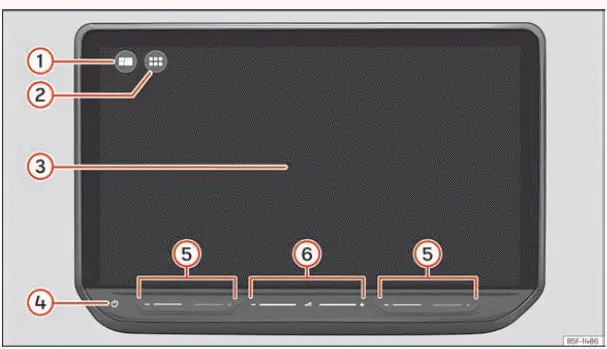
Fig. 171 Overview: control unit
- HOME button
 : opens the main menu layout featuring configurable widget views.
- MENU button
 : opens the comprehensive main menu displayed in a tile grid mode.
- Touch screen. All primary infotainment functions, media controls, and vehicle settings can be operated directly through this screen.
- On/Off touchpad (used to power the infotainment system on or off).
- Touch zones (tactile slide areas to raise and lower the climate control temperature).
- Touch zones (tactile slide areas to increase and decrease the audio system volume).
 First steps
Introduction
Infotainment functions, system menus, and available settings on your Seat Leon depend heavily on your regional market specifications and the vehicle's equipment level.
Before first use
...

See also:
Assembly overview - wheel bearing
Assembly overview - wheel bearing assembly, torsion beam axle
- Grease cap
Always renew after removing
Removing and installing
A proper seal can be
achieved only by installing
a n ...
