
Seat Leon >> Lane Assist system
Introduction
The Lane Assist system integrated into your Seat Leon is designed to help the driver stay securely within the designated travel lane, operating strictly within the physical limits of the system. This driver support function is not suitable and is never intended to keep the vehicle automatically centred in the lane without human oversight.
Utilizing the high-resolution optical camera mounted on the upper windscreen, the Lane Assist system actively detects the painted lane markings and boundary lines dividing the lanes in which your vehicle is travelling. If your Seat Leon drifts too close to a detected lane limit without an active signal, the system alerts the driver and provides gentle corrective steering torque to nudge the car back. The driver can override or cancel this corrective steering action at any time with minimal effort.
No steering warning or correction will be given when the directional turn signals are activated, given that the Lane Assist system correctly understands that a deliberate lane change is required.
System limits
For optimum performance and safety, use the Lane Assist system primarily on large, well-maintained motorways and highways.
The system is temporarily unavailable or will not intervene under the following conditions:
- The allowed vehicle speed is below approximately 60 km/h (35 mph).
- The optical system has not detected any clear lane lines or markings.
- When navigating through sharp, tight bends.
- Temporarily during very dynamic or sporty driving situations.
- If the driver actively and firmly resists or rectifies a system steering intervention.
- If a lane marking is crossed deliberately despite active system intervention.
- If the driver fails to react to an instrument cluster prompt requesting hands-on intervention.
WARNING The intelligent technology powering the Lane Assist system cannot alter or overcome the limits imposed by the unyielding laws of physics and the inherent design constraints of optical camera systems. Careless, distracted, or uncontrolled use of the Lane Assist system can cause serious accidents and personal injury. This feature is never a replacement for continuous driver awareness, concentration, or active steering control.
- Always adapt your driving speed and the following distance to vehicles ahead in line with prevailing visibility, weather conditions, road surface quality, and immediate traffic dynamics.
- Always keep your hands on the steering wheel so that steering can be corrected or taken over at any moment. The ultimate legal responsibility for staying safely in your lane always rests entirely with the driver.
- The Lane Assist system does not detect every single road marking. Degraded road surfaces, worn asphalt, road structures, or surface objects in poor condition can sometimes be incorrectly interpreted as lane markings under certain circumstances. Immediately counter and correct any unwanted intervention by the system.
- Please observe all advisory indicators on the digital instrument cluster and act promptly as necessary if the traffic situation permits.
- In the following situations, there may be unexpected, undesired interventions by the system, or it may fail to intervene entirely. In these specific scenarios, heightened driver attention is required, alongside the temporary deactivation of the lane assist warning system where appropriate:
- During very sporty or aggressive driving situations.
- Under severe adverse weather conditions or on roads in poor physical condition.
- When passing through active roadworks and construction zones.
- Before abrupt gradient changes, sharp dips, or bridge transitions.
- Always observe the vehicle's surrounding environment carefully and drive proactively.
- When the optical field of vision of the windscreen camera becomes dirty, obstructed by mud or snow, or physically damaged, the performance of the Lane Assist system can be severely affected or disabled.
Driving with the Lane Assist System
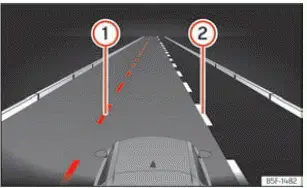
Fig. 144 On the instrument cluster display:
indications of the lane assist system.
- Yellow line: The system is actively intervening to provide corrective steering support on the highlighted side.
- White line: Clear lane boundary detected. The system stands ready to intervene on the displayed side.
When the boundary line appears grey, the lane line has been optically identified, but the system remains in a passive standby state or is unavailable for active steering intervention.
Depending on your vehicle's specific equipment level, supplementary details of the lane markings currently identified by the windscreen camera—such as broken or dashed road lines—can also be rendered on the digital instrument cluster display screen.
Control lamps
 Lights up grey
The lane departure warning system is switched to passive standby and is currently unavailable for active steering guidance.
 Lights up green
The Lane Assist system is fully active, operational, and monitoring detected lane boundaries.
 Lights up yellow
The Lane Assist system is actively intervening by applying corrective steering torque to correct vehicle trajectory.
Switching the lane assist system on or off
In accordance with local market regulations, the Lane Assist system in your Seat Leon is automatically activated every time the ignition is switched on. The function can be toggled on or off via the infotainment system's  Vehicle menu, or through the driving assistants selection overlay on the instrument cluster by pressing the
 button on the multifunction steering wheel.
The Lane Assist system is engineered to provide active steering intervention from speeds of approximately 65 km/h (40 mph) upwards, provided clear lane boundaries have been detected by the front camera.
When a directional turn signal is engaged prior to changing lanes, the system temporarily transitions to a passive state in the indicated direction while remaining ready to intervene on the opposite side.
If the driver applies energetic rotational force or manually overrides the steering wheel, the system will instantly step back into a temporary passive state.
 When Lane Assist is manually switched off, the yellow disconnection warning indicator lamp illuminates on the instrument cluster (depending on country specifications).
Note If a persistent electrical or optical system fault occurs, Lane Assist may automatically deactivate itself.
Driver intervention prompt
If the driver removes their hands or fails to maintain active steering input, the system prompts the driver to resume control via visual notifications on the instrument cluster accompanied by clear audible warning chimes.
If no driver steering response is detected following these alerts, the system automatically steps down to a passive standby state.
Depending on optional safety equipment fitted to your Seat Leon, Emergency Assist may then automatically take control to safely bring the vehicle to a controlled stop.
Regardless of ongoing steering inputs, visual dashboard warnings and acoustic alerts will prompt the driver to keep the vehicle centred if continuous automated steering corrections persist for longer than reasonable.
Steering wheel vibration
The following driving scenarios may cause tactile vibration through the steering wheel rim:
- The detected lane boundary suddenly ceases to be recognized while the system is actively applying a corrective steering intervention.
You can also enable haptic feedback within the Vehicle menu in the infotainment system settings. When this feature is active on your Seat Leon, crossing over a detected lane boundary with Lane Assist enabled will induce a subtle warning vibration through the steering wheel rim.
Troubleshooting
 The lane departure warning assistant is not available
The control lamp illuminates in yellow, accompanied by a corresponding diagnostic message on the instrument cluster display screen.
- A system fault or electrical defect has occurred. Switch off the engine, wait a brief moment, and start the vehicle again to reset system memory.
- The camera's field of vision behind the windscreen is dirty or fogged over.
Thoroughly clean the outer windscreen area in front of the camera module.
- Optical visibility for the camera is obstructed due to external accessories, stickers, or windshield damage.
If the camera's optical field of view is blocked by dirt, ice, snow, stickers, or physical obstructions, the following temporary warning message will appear on the instrument cluster alongside an audible alert chime:
" Driver assist limited now. Front sensors without visibility."
For complete details regarding sensor maintenance and care, consult the specialized section on Drive assist sensors and cameras.
The system behaves differently than expected
- The camera housing alignment has shifted or the glass has suffered physical damage, such as a crack or stone chip in the windscreen.
Inspect the glass surface directly in front of the sensor module for visible damage.
- Do not attach or mount heavy objects, phone holders, or covers to the steering wheel rim that might interfere with touch sensors.
If the operational fault persists, visit an authorized specialist workshop for technical assistance.
Note After turning on the ignition, it may take several seconds for the onboard diagnostic system to perform self-checks and flag a system fault.
Note If Lane Assist is unavailable or deactivated due to a system fault, Emergency Assist and Travel Assist features will also be rendered unavailable.
 Manual activation and deactivation
of the function
Front Assist status indicators and advisory notices appear clearly on the instrument panel display screen.
Front Assist is automatically active whenever the vehicle's ignition is switched on. When ...
 Travel Assist
...
See also:
General notes
The electronic stabilisation program increases the vehicle's
stability on the road.
The electronic stabilisation program helps to reduce the danger of skidding.
The electronic stabilisation progr ...
