
Seat Leon >> Seat functions
Memory function
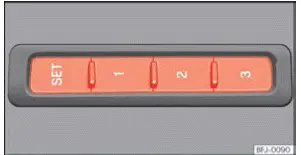
Fig. 101 On the outer side of the driver's seat:
memory buttons.
Memory buttons
The integrated power seat memory buttons allow you to conveniently save and re-activate customized position settings for the power driver's seat and exterior rearview mirrors.
These personalized settings are also saved directly under your active user profile in the online cloud services.
Save the settings for the driver seat and exterior mirrors for forward gear
- Apply the electronic parking brake securely.
- Ensure the transmission gear selector is set to the neutral position (or Park for automatic models).
- Switch the engine ignition on.
- Adjust the driver's seat position, backrest angle, and both exterior mirrors to your exact preference.
- Press and hold the set button for longer than 1 second ››› Fig. 101.
- Press your chosen memory preset button within approximately 10 seconds of releasing the set button. An audible confirmation chime will sound to confirm that your settings have been successfully stored.
Save the settings of the front passenger exterior mirrors for reversing.
- Apply the electronic parking brake.
- Ensure the gearbox is in neutral or park.
- Switch the ignition on.
- Press the specific memory preset button you wish to use.
- Engage reverse gear.
- Adjust the front passenger exterior mirror angle downward so that you can clearly view the kerb edge and rear wheel during parking maneuvers.
- The adjusted mirror tilt position for reversing is automatically saved and linked to the specific remote key fob you used to unlock your Seat Leon.
Activating the settings
- With the vehicle completely stationary and the ignition switched on, press and hold your assigned memory preset button until the seat and mirrors reach their fully saved positions.
- OR: With the engine ignition switched off and the driver's door open, simply press the corresponding memory button briefly.
The front passenger side exterior mirror automatically switches back from its lowered reverse parking position to the normal driving view as soon as your Seat Leon moves forward at a speed exceeding 15 km/h (10 mph) or when the gear selector lever is shifted to any position other than reverse (R).
Initialising the seat position memory
If major components like the driver's seat assembly have been replaced, the electronic position memory system must be re-initialized from scratch.
Performing this initialization procedure deletes all previously saved memory slots and key assignments. The memory buttons can then be programmed fresh with new positions.
- Open the driver's door fully and stand outside without sitting in the vehicle.
- Adjust the power seat settings using the exterior controls.
- Tilt the seat backrest fully forward.
- Release the backrest inclination switch and press it forward again continuously until an audible warning signal sounds.
Easy Entry function
Depending on your vehicle's equipment trim level, the convenient Easy Entry function makes getting in and out of your Seat Leon much easier by automatically sliding the driver's seat backward when exiting and returning it forward upon entry.
This feature can be enabled or disabled via the driver profile settings located in the seat configuration submenu of the central infotainment touchscreen.
WARNING Only operate the seat memory recall function when the vehicle is completely stationary to prevent unintended posture shifts while driving.
Note If the driver's door is opened approximately 10 minutes after the vehicle was unlocked or later, the driver's seat and exterior mirrors will not move automatically to saved positions upon entry.
Front centre armrest
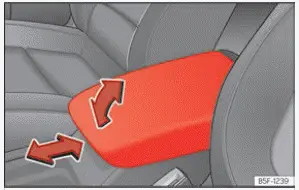
Fig. 102 Front centre armrest
To raise the front centre armrest of your Seat Leon, pull it firmly upward in the direction of the arrow indicator ››› Fig. 102, either in incremental steps or all the way up, depending on your preferred arm support height.
To lower the armrest back down from an elevated position, first lift it past its highest notch until the ratchet mechanism resets. Then guide it downward smoothly.
To adjust the armrest horizontally for better ergonomic comfort, slide it forward ››› Fig. 102 or backward as far as it will travel in the direction of the corresponding sliding arrow.
WARNING An improperly positioned or overloaded front centre armrest may obstruct the driver's natural arm movements and steering control, which could cause an unexpected loss of vehicle control and severe injuries.
- Always keep the internal storage compartment lids of the centre armrest securely closed at all times while your Seat Leon is in motion.
- Never allow any passenger to sit or lean on the centre armrest while the vehicle is moving, not even a child. This improper seating position offers zero crash protection and may result in severe personal injuries during sudden braking or collisions.
Unlock the seat backrest with the cord.
Valid for: LEON Sportstourer
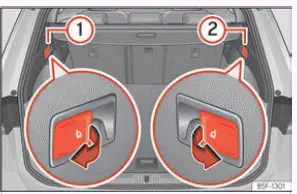
Fig. 103 In the luggage compartment: levers
to unlock the rear backrest.
- Lower all rear headrests completely into their stowed positions.
- Open the rear luggage tailgate fully.
- Pull the remote release lever corresponding to the left ››› Fig. 103 1 or right 2 split section of the backrest firmly in the direction of the arrow. The unlatched section of the rear seat backrest will automatically release and fold down forward to expand cargo space.
- Once folding is complete, close the rear luggage lid if needed.
Remember that the rear backrest is not safely engaged whenever a red warning marker is visible on the latch release button ››› Fig. 96 2.
 Headrest
Introduction
Proper adjustment and removal procedures for the headrests are detailed below. Always verify that all seating positions are correctly set up before starting a journey.
Every seat in y ...
 Lights
...
See also:
Petrol engine 2.0l 147 kW (200 bhp). Manual
General engine data
a) With a slight power loss
Performance figures
Weights
Trailer weights
Engine oil filling capacity
...
