
Seat Leon >> SEAT Digital Cockpit
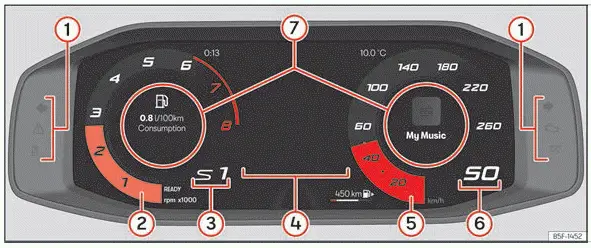
Fig. 1 SEAT Digital Cockpit on the instrument
cluster (classic view).
- Control and warning lamps
- Rev counter tracking engine revolutions per minute
- Currently engaged gear or transmission selector lever position
- Central screen display area
- Speedometer dial indicating current velocity
- Digital speed display readout
- Information Profile selection area
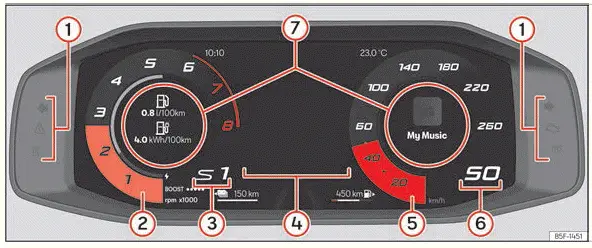
Fig. 2 Hybrid vehicles: SEAT Digital Cockpit on the instrument cluster
(classic view).
- Control and warning lamps
- Rev counter and powermeter measuring hybrid engine and electric motor output
- Gear engaged or selector lever position
- Screen displays and menus
- Speedometer dial
- Digital speed display readout
- Information Profile options
The SEAT Digital Cockpit serves as an advanced digital instrument cluster built around a high-resolution, full-color TFT display screen designed specifically for the Seat Leon dashboard layout.
It provides three distinct layout views that can be accessed instantly using the dedicated VIEW button located on the multifunction steering wheel.
By selecting different information profiles through the vehicle menu, drivers can replace standard circular instrument dials with customized readouts such as detailed navigation maps, multimedia song details, or comprehensive travel trip statistics.
The 3 available instrument views are:
- Classic
- Dynamic
- Navigation
Every available view renders essential real-time information on the screen concerning active audio playback, telephone status, journey computer data, current vehicle status, route guidance, and driver assistance systems.
Information profiles
The horizontal arrow buttons on the multifunction steering wheel allow you to browse seamlessly through the various information categories displayed across the SEAT Digital Cockpit.
Important information regarding overall vehicle status, travel computer statistics, and odometer tracking will always appear conveniently on the left side of the screen.
Meanwhile, the right-hand side of the display focuses on active media audio, paired telephone information, compass heading directions, and upcoming navigation maneuvers.
Depending on the specific layout view currently chosen, the center of the SEAT Digital Cockpit presents tailored information covering the following areas:
- Classic View and Dynamic View: Initial trip data, current date, accumulated distance traveled, and estimated remaining driving range. Turning the right thumbwheel on the multifunction steering wheel brings up the navigation map or driving trip data, while pressing the OK button cycles between different memory banks.
- Navigation View: Pressing the OK button on the multifunction steering wheel followed by scrolling the thumbwheel lets you smoothly zoom in or out of the active map view. Pressing the OK button once more restores the mapping display to its automated scaling mode.
Classic and Dynamic View:
The rev counter and speedometer needles expand to their full length whenever you press and hold the VIEW button on the multifunction steering wheel, regardless of whatever menu content happens to be active in the central display zone ››› Fig. 1 , ››› Fig. 2.
Pressing and holding the VIEW button down once more safely restores the instrument cluster screen to your previous layout view.
Alternatively, you can open the main instrument cluster menu, locate the X Close option using the right-hand thumbwheel on the multifunction steering wheel, and press OK to exit.
Information that may be displayed in the middle of the SEAT Digital Cockpit speedometer
- Active audio and media track information
- Connected telephone and call status
- Compass heading orientation
- Navigation guidance instructions, where recent destinations appear simply by pressing the right arrow key on the multifunction steering wheel
- X > OK shortcut option to close the classic view layout
Information that may be displayed in the middle of the SEAT Digital Cockpit rev counter
- Current fuel consumption and average trip consumption statistics, where pressing the left arrow button on the multifunction steering wheel lets you switch between various journey memory banks
- Estimated driving range based on fuel tank levels
- Engine lubricating oil temperature and coolant temperature gauges
- Average journey speed, with left arrow clicks on the steering wheel allowing you to toggle through alternative memory tracking logs
- Additional travel data metrics, including kilometers traveled and total driving duration, switchable via the left steering wheel arrow
- Active driver assistance systems monitoring status
- X > OK shortcut option to close the classic view layout
 Introduction
After starting the engine of your Seat Leon following a period where the 12-volt battery was heavily discharged or replaced with a new unit, certain customized system settings—such as the time, date ...
 Rev counter
The rev counter displays the engine's rotational speed, measuring the total number of crankshaft revolutions per minute to help you monitor powertrain performance in your Seat Leon.
Working in conj ...
See also:
Fuel level / reserve
This symbol lights up to indicate that the fuel tank is down to
the reserve level.
This lights when only 7 litres of fuel remain in the tank. Also, an
audible
warning is given. This serves as a r ...
