
Seat Leon >> Comfort menu
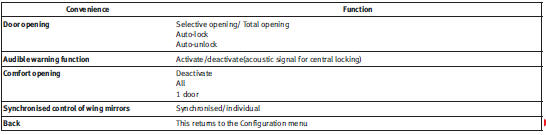
From this menu it is possible to alter the different Comfort function settings.
To open the Comfort and Convenience menu
– Choose the option Configuration from main menu and press the
button A on the windscreen wiper lever.
– Choose the option Comfort from main menu and press the button A
on the windscreen wiper lever.
Example of menu use: “Example of menu use”
Note
For electronic and vehicle equipment one or more of these menus will be
displayed.
 Configuration menu
This menu is used to make the settings for the vehicle functions.
Open Configuration menu
– Choose the Configuration option from main menu “Main menu”
and press the button on the windscreen w ...
 Lights and visibility menu
From this menu it is possible to alter the vehicle lighting settings.
Open Lights and visibility Menu
– Choose the option Configuration from main menu: “Main menu”
and press the button A on t ...
See also:
Removing and installing suspension strut
Special tools and workshop
equipment required
Torque wrenches - V.A.G
1332-
Spreader - 3424-
Engine elevator - V.A.G
1383 A-
Mounting - T10149-
Special tools and workshop equipment ...
